Aggregation Controls Settings
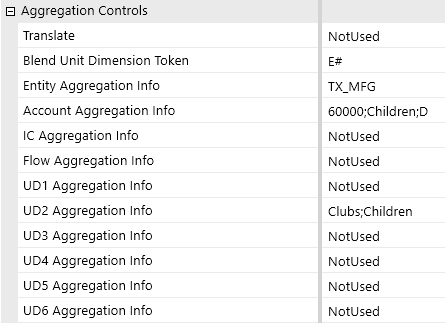
Translation
Enables translation to a single destination currency. Translation occurs during a Blend import, even if Entity and Account do not have aggregation info defined. Only the direct method is applied based on the rate types defined in the cube settings, which are determined by the account type. No complex currency translation is supported by sub-parent levels. All Entities are translated to the destination currency. You can choose from the following options:
-
Not Used: Amounts are not translated
-
Currency symbol: Amounts are translated to the selected currency
Blend Unit Dimension Token
An aggregation point must be set for the Blend Unit dimension. This assigns the cube dimension as the partitioning dimension to generate pages and the corresponding level of multi-threading. These are the available dimensions for the Blend Unit:
-
MaxMembersDim: Dynamically sets the Blend Unit as the dimension that has an aggregation point set and has the most members
-
E#: Sets Entity as the Blend Unit
-
F#: Sets Flow as the Blend Unit
-
UD1#-UD8#: Sets the chosen UD dimension as the Blend Unit
-
A1#-A20#: Sets the chosen Attribute dimension as the Blend Unit
Aggregation Controls
Dimension/Attribute Aggregation Info
Example: If an aggregation control for Entity is set for US Clubs, any records present in the data set for Entities outside the US Clubs hierarchy are ignored.
When using BI Blend with extended dimensions, BI Blend only aggregates the ultimate base members of an extended dimension. Loading a member that becomes a parent as a result of dimension inheritance, such as mapping source data to a parent member, results in no aggregation for the extended parent.
Aggregation controls can be set on any dimension or attribute in addition to the Blend Unit dimension. Setting additional aggregation points on non-Blend Unit dimensions and attributes results in base-level records being aggregated up those hierarchies in addition to the Blend Unit hierarchy.
Aggregation Control Types
If NotUsed is selected, the records import to the base-level members only for that dimension. The records will be collected at the row record level if included in the data source.
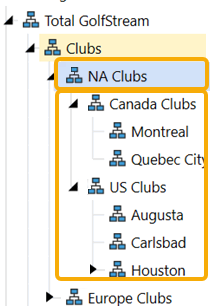
For parent level selection, selecting a single parent limits the records to the members within that hierarchy and generates records for all members with data within the hierarchy.
Example: Selecting NA clubs would create records for NA Clubs as TreeDescendentsInclusive.
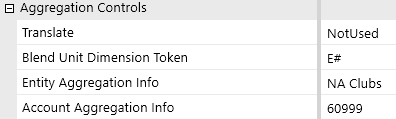
Aggregation, label, and Star Schema options are applied to the import in accordance with the controls set. They are applied in this order: TopMember;RestrictMember;Labels;StarSchemaControl.
If you are using a UD8 dimension, you must include the dimension hierarchy name.
Example: DimensionName:TopMember;RestrictMember;Labels;StarSchemaControl.
If you are not using an option, you still need to include the semicolon as a placeholder for the option.
Example: TopMember;;;StarSchemaControl.
NOTE: Applying aggregation information filters returns both the filtered parents and the base member records. The exception to this behavior is when the Blend Unit dimension uses the ;Member filter. The Member filter on a Blend Unit dimension returns only that member.
Member Control
Parent Level Selection, as Member
The dimension assigned as the Blend Unit can be restricted to return a summary parent member. In this situation, the results are only required for an aggregated parent. By entering the setting as NA Club;Member, all the descendant’s results will be aggregated to the parent, but the descendant members will not be included in the output. The option for a specified Parent Member is only available in the Blend Unit.
For non-Blend Unit dimensions, using ;Member will return the Parent Member defined, as well as all the base members found within the parent member’s hierarchy.
Parent Level Selection, Children
This focuses aggregation points to a member’s children. The selection of NA Clubs;Member.Children property returns the children of the parent member as Children Inclusive. Alternatively, NA Clubs;Children can be used as a non-inclusive filter. Base members are also returned.
Parent Level Selection, TreeDescendants
This is a non-inclusive option. Records are aggregated and returned for every level in the hierarchy except for the named member.
| Dimension Syntax | Example | Impact |
|---|---|---|
| Member | ||
|
<Member name>;Member |
Clubs;Member |
Blend Unit dimension: All records are aggregated on the named member, but only records for the named member are returned and not any base-level records. Other dimensions: Base-level records are returned in addition to the records aggregated on the named member. |
| Children | ||
| <Member name>;Children | Clubs;Children | Records are aggregated on the named member’s children but not on the named member. |
| Member.Children | ||
| <Member name>;Member.Children | Clubs;Member.Children | Records are returned for the named member’s children and the base-level members. |
| Tree Descendants | ||
| <Member name>;TreeDescendants | Clubs;TreeDescendants | Records are aggregated and returned for every level in the hierarchy except for the named member. |
| No Expansion | ||
| <Member name> | Clubs | Records are aggregated and returned for every level in the hierarchy including the named member |
Label Control
Reporting Labels as Name, Description or Name and Description
By default, any dimension set as an aggregation will return the results using the Name field found in the dimension properties. To modify results, the dimension or attribute must be used as an aggregation control. Using the label properties on a standard non-Star Schema BI Blend table replaces the record with the labeling method.
| Dimension Syntax | Example | Impact |
|---|---|---|
| N: Name | ||
|
Member name>;;N |
Clubs;;N |
The member name is used in the imported records. This is the default setting. |
| D: Description | ||
| <Member name>;;D | Clubs;;D | The member description is used in the imported records. |
| ND: Name and Description | ||
| <Member name>;;ND | Clubs;;ND | Both the member name and description are used in the imported records. |
Star Schema Control
Star Schema Only
The SSOnly filter can be used when the Create Star Schema property is set to True in the Data Controls settings. This setting will not generate parent level records in the BI Blend data table. The SSOnly aggregation control creates a complete Star-Schema dimension table containing the following fields for cube dimension hierarchy as specified by the parent member in the aggregation control: MemberName, MemberDesc, NameAndDesc, ParentName, IndentLevel, IsBase, and MemberSeq .
Star Schema Leveled Hierarchy
The SSLeveled property can be used when the Create Star Schema property is set to True in the Data Controls settings. If enabled, the corresponding Star-Schema dimension table has to have zero-based column fields added, which corresponds to the hierarchical structure of the dimension. This is not valid for use on Account and Attributes. See Leveled Hierarchy.
NOTE: An aggregation point or member must be defined on the Blend Unit dimension.
| Dimension Syntax | Example | Impact |
|---|---|---|
| SSOnly | ||
|
<Member name>;SSOnly |
Clubs;SSOnly |
No records are aggregated during the import. A dimension table is produced to capture the dimension hierarchy. This control cannot be used with a member or label control. This can only be used if Star Schema is enabled. |
| SSLeveled | ||
| <Member name>;;;SSLeveled | Clubs;;;SSLeveled | Additional hierarchy description columns are added to the dimension tables and view. Star Schema must be enabled. |
Combining Controls
All controls specified are applied. Any combination of control types can be used. They are applied in this order: <Member name>;<Member expansion>;<Label option>;<Star Schema control>.
Example: Clubs;Member;ND;SSLeveled
Example: Houstin;Member;ND
Example: Houstin;Member.Children;D
Example: Houstin;;;SSLeveled
Attribute Dimension Syntax
Prefix the dimension syntax expression with the <UD8 dimension hierarchy name>;. The number of fields is larger due to the inclusion of the dimension name.
Example: Dimension Name; TopMember;RestrictMember;Labels
Example: UD8BlendAttributes;Contracts;;D
Example: UD8BlendAttributes;Contracts;Member;D


