Time Pivot
FDX APIs with the suffix TimePivot enable you to extract multiple time periods and treat Time as a measure. To import multiple time periods as measures, enable the Attribute Value and xBlend Attribute Value dimensions, depending on how many time periods are needed. Once enabled, add them to the data source and map them to the source data fields.
Treating time as a measure improves performance when working with multiple time periods. Using FDX APIs results in flatter in-memory tables. If you pivot Time in a data table containing multiple time periods, the data for each time period is stored in separate columns. For example, the following tables display the same amount of data. One table stores Time as a dimension. The other table has pivoted Time and stores it as a measure. The table where time is stored as a measure is flatter and is faster to process due to fewer rows.
Time as a Dimension
The time periods are in the Time column, and there is a separate Amount column to store the values.
| Entity | Scenario | Time | Account | Amount |
|---|---|---|---|---|
| E1 | Actual | 2025M1 | Account Receivable | 150 |
| E1 | Actual | 2025M1 | Gross Revenue | 150 |
| E1 | Actual | 2025M1 | Cash | 50 |
| E1 | Actual | 2025M2 | Account Receivable | 250 |
| E1 | Actual | 2025M2 | Gross Revenue | 250 |
| E1 | Actual | 2025M2 | Cash | 100 |
Time as a Measure
Time is pivoted so that there are time columns for 2025M1 and 2025M2 to store the amounts.
| Entity | Scenario | Account | 2025M1 | 2025M2 |
|---|---|---|---|---|
| E1 | Actual | Account Receivable | 150 | 250 |
| E1 | Actual | Gross Revenue | 150 | 250 |
| E1 | Actual | Cash | 50 | 100 |
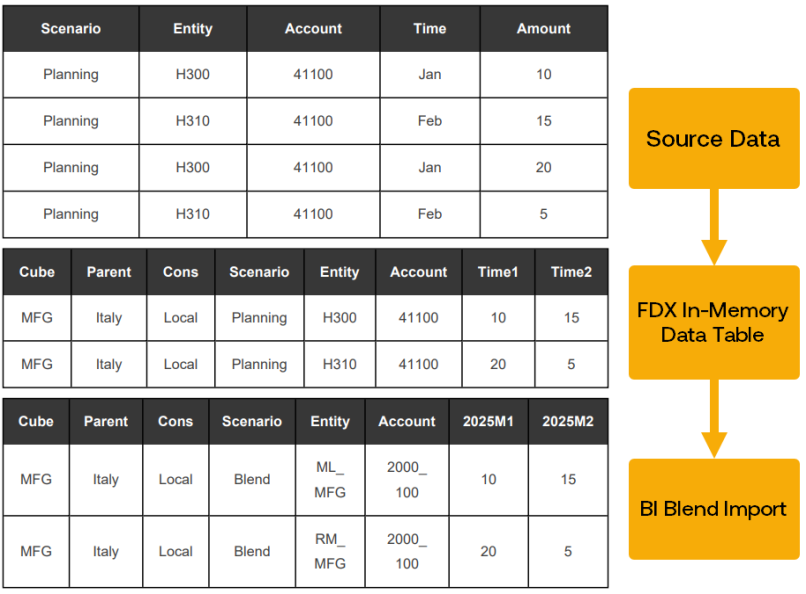
Source Data
In the source data table, Time is stored as a dimension, not as a measure. The time periods are in the Time column with the distinct time periods in rows. There is a separate Amount column to store the values.
FDX In-Memory Data Table
The FDX Warehouse BRApi extracts the data and stores it in an In-Memory data table. Time is pivoted so that Time is a measure. There are columns to store Jan and Feb amounts: Time1 and Time2. The column headers and members names are still the source member names. They have not been transformed yet.
BI Blend Table
The data is then imported into the BI Blend table where Time is also treated as a measure. The transformation rules are processed so column headers and member names show the target members and names. For example, Time1 is transformed to 2025M1, and Entity member H300 is transformed to ML_MFG. The data is stored against the Scenario dimension member that has been used to import the Blend data.


