Business units can inherit standard dimensions from a standard set that corporate may maintain, but Extensible Dimensionality® also allows them to extend those dimensions to suit their own process and reporting needs. This allows for operational significance for the business units yet grants control of the overall process to corporate.
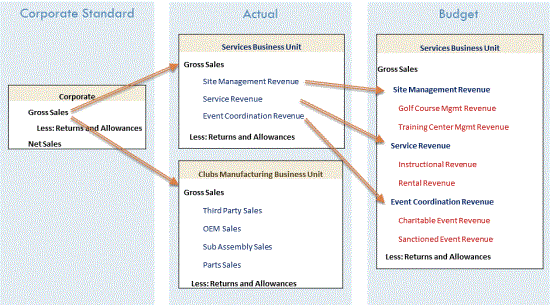
The diagram below shows an example of how a certain account can be extended differently across a service business unit as opposed to a manufacturing business unit across the Actual and Budget scenarios. Notice how each business unit can look at Gross Sales differently in the Actual scenario. The Services business unit can also look at Gross Sales at an even greater level of detail in their Budget scenario.
This is possible due to three reasons:
-
Extensible Dimensionality® can inherit dimensions and extend them. There are four different Account dimensions in the example that inherit from each other like this:
-
Corporate Accounts
-
Club Manufacturing Accounts
-
Services Accounts
-
Services Budget Accounts
Corporate Accounts is the main chart of accounts. Club Manufacturing takes that dimension and extends it to add its own accounts, but it cannot change what is in Corporate Accounts. Services also takes Corporate Accounts and extends it to meet its needs for the Actual scenario and extends its own Services Accounts to meet its need for more detail in its Budget scenario in the Services Budget Accounts dimension. However, when designing an extended dimension, members are either added below inherited members for additional detail, or to an alternate rollup by creating new parent members and then referencing inherited members below the new parents. Both actions cannot be done at the same time in the same section of the hierarchy.
-
-
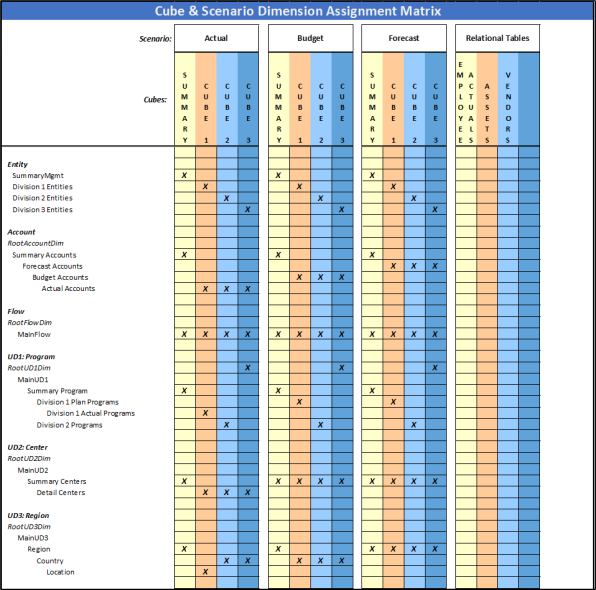
Different dimensions can be assigned to different cubes and that dimensional assignment can be different for each Scenario Type. In the example, there are three cubes: Corporate, Clubs, and Services. When looking at the Corporate cube, data from the three cubes is there for analysis. In Corporate, the Corporate Accounts dimension is assigned to all Scenario Types. In Clubs, the Clubs Manufacturing Accounts dimension is assigned to all Scenario Types. In the Services cube, the Services Accounts dimension is assigned to every dimension except for Budget, which is where the Services Budget Accounts dimension is assigned.
-
The Clubs and Services cubes have their own respective Entity dimensions referenced in the Corporate cube. The Entity dimensions tie the data together.
NOTE: Other dimensions such as Flow and the User Defined dimensions can also be extended and have flexible cube assignment if needed.
IMPORTANT: Using Extensible Dimensionality to extend accounts used in the Intercompany Matching process is not a recommended practice.
Extensibility concepts are broken down into the following categories:
-
Vertical Extensibility
-
Workflow Extensibility
-
Platform Extensibility
-
Horizontal Extensibility
Vertical Extensibility
Vertical or Entity/Cube extensibility relates to the ability to include or exclude detail at different levels up the entity hierarchy. It is important to properly manage Data Unit size to enable optimal performance while accounting for future growth. Vertical extensibility also relates to varying dimensionality across business units. With vertical extensibility, lower-level entities still report at a detailed level, but the data can collapse to a summary level to facilitate reporting and increase performance. Vertical extensibility provides flexibility to vary dimensionality at a detailed level but consolidate to a common summary level. There can also be separate cubes for different uses, such as Human Resource data or Cost Drivers. These cubes can still reference other cube data through the CB# qualifier in Member formulas.
Workflow Extensibility
Workflow extensibility enables variation in the input steps and methods within each process flow. Workflow steps and settings are adjustable in each Scenario Type, or can be combined if multiple processes follow the same responsibility hierarchy. You can configure workflow extensibility on each parent cube to tailor the software interface to match process needs. There can be different Workflow Profile hierarchies per Scenario Type which is defined at the cube level.
Example: An Actual scenario might be loaded from 12 GL systems across 500 entities, and Budget Forecast and Variance can define a Workflow for each of the 500 entities with regional review and sign off levels.
If your actual data collection process is more import driven, and the planning process driven by calculations and dashboards, workflow extensibility can split these processes to ease management from an administrative standpoint. Some data collections may require centralized import while others are distributed to more end users. You can assign entities only once in a workflow hierarchy, so workflow extensibility can be used to vary entity sign off responsibilities and allow for differing entity assignments.
Platform Extensibility
Platform extensibility relates to variation in data storage locations and how it is utilized within the platform. Platform extensibility also enables multiple applications within one environment that can talk to each other. OneStream has the unique ability to consume, utilize, and report on data regardless of its storage in cubes, relational tables, or even external locations. With platform extensibility, Cube data can combine with relational data to achieve optimal balance between performance and reporting needs. Platform extensibility also allows use of relational data, web content, and external data sets.
Horizontal Extensibility
Horizontal Extensibility relates to the extension and use of different levels in a hierarchy for different business purposes. It also allows targeting of when and where the data model needs to include dimensions.
Example: You can input data at a parent level. A parent becomes a base for input in a different scenario by using the scenario type settings and properly applying cube dimension assignments. See Cube Dimensions.
Example: If you have highly detailed metadata that only applies in a specific use case, horizontal extensibility can help limit potential intersections that are invalid for all other use cases by assigning metadata only where it is relevant.
Recommended Implementation of Extensibility
There is not a universal way to implement extensibility in OneStream. Applications without extensibility commonly run into issues. A lack of vertical and platform extensibility can lead to performance issues. A lack of horizontal and workflow extensibility can lead to flexibility issues. Applications with too much extensibility encounter fewer performance or flexibility issues, but do have a higher maintenance burden. Balancing performance, usability, and maintenance is key. In most cases, it is recommenced that extensibility is considered in every design and implemented . When designing a solution, building a matrix can help you visualize the details and where they need inclusion, and then you can start shaping Scenario Types, cubes, dimensions, and any platform extensibility.
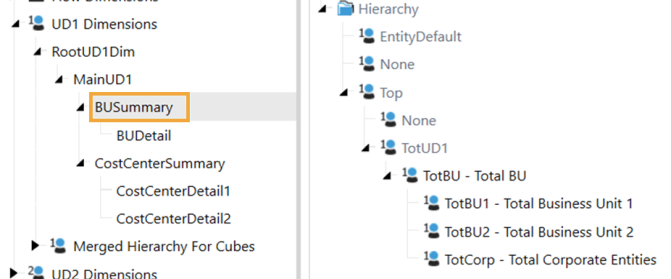
The CPM Blueprint application contains examples of extensibility configurations using general best practices. UD1 is an example of using the common configuration of a MainUD1 dimension parent to summarize the BU and Cost Center details into a common dimension.
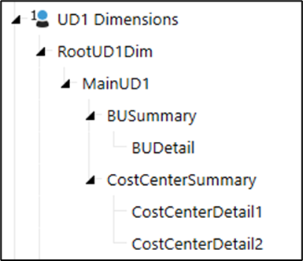
Applying this concept to all User Defined dimensions facilitates both vertical and horizontal extensibility. To create vertical extensibility, dimensional detail that is not needed in a parent cube can be collapsed by assigning MainUD1.
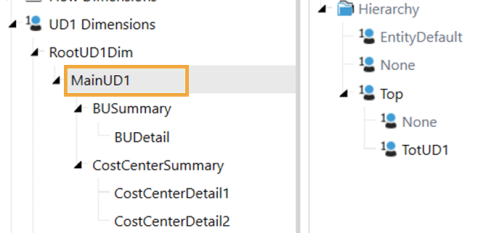
The dimensional detail is the extended from TotUD1 to expand into necessary levels of detail for each data collection and reporting need. This allows both None and Top to be active at all levels in the dimensional hierarchy.
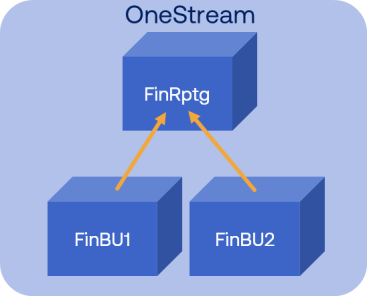
Another example of extensibility in the CPM Blueprint application is in the cube configuration. The configuration focuses on the financial reporting structure in this application and follows the recommendation for a base-summary cube relationship between Business Unit and total company reporting. This configuration has several benefits:
-
More flexibility to expand child cubes horizontally and plug in different dimensionalities
-
Greater ability to collapse the data unit if its size becomes an issue
-
Further future-proofing by enabling more platform expansion with the same foundation
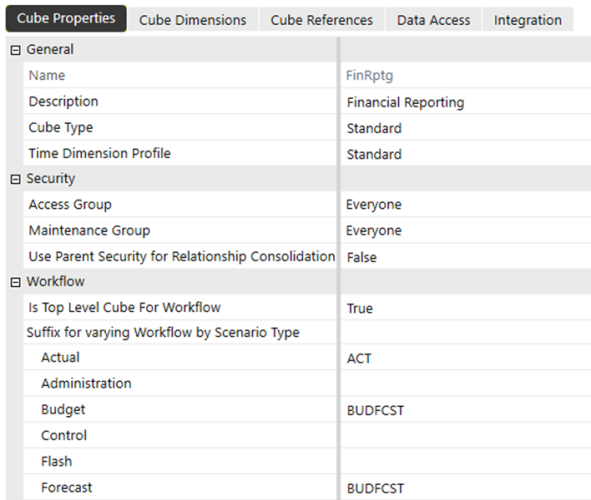
This application also has workflow extensibility on display. You can see the connection between top level and base level cubes in the cube settings, and the workflow suffixing applied in the CPM Blueprint application. In this example, the Actual Scenario Type has a different process flow and responsibility hierarchy from other data collections, so it has own suffix of ACT Budget and Forecast follow the same process flow and responsibility hierarchy, so they share a workflow suffix of BUDFCST This enables each process to have its own configuration and entity assignment.