The Factor Sources page enables you to select available Factors in the solution. Controlling the selected sources improves performance and factor relevancy by limiting the number of Factors downloaded to the solution. Factors cannot be updated on the Factors page until Sources are assigned. See External Factors.
NOTE: All data sources available in Sustainability Solution are provided by Climatiq with access limited to core license data sources. To review all available data sources, see Climatiq Core Data Sources.
The Available Factor Sources grid displays all Sources available and the corresponding Factor Count. The Assigned Factor Sources grid displays all sources assigned to the solution. To assign and unassign sources, select the source in either grid and select the Move Down icon or the Move Up icon to move it between grids.
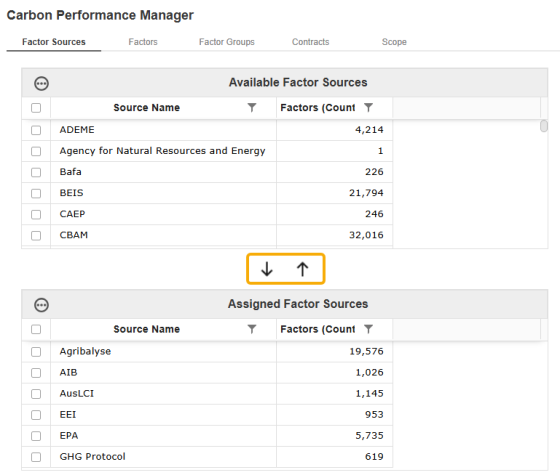
NOTE: The Factor Sources page automatically updates to the most recent Climatiq version, even if Factors are not updated on the External Factors page.
Modifying Sources
If a Source is updated, added, or removed, you are prompted to download the external Factors available each time you navigate to the External Factors page.
A slide-out panel displays to prompt the download. To download Factors, select the Download button. To bypass the download and view existing Factors without source modifications, select the Close button.
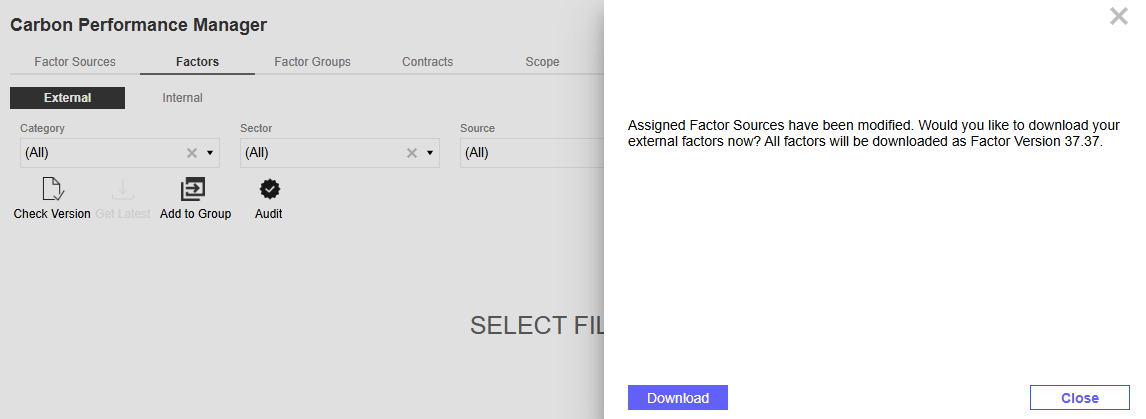
IMPORTANT: For all Source modifications to download to the External Factors page, Factors must be updated to the most recent Climatiq version.

