|
|
Invite User enables a system administrator to send an invitation to a user who has an existing Azure AD or Office 365 account not currently in the Azure AD tenant hosted by OneStreamCloud Services. After accepting the invitation, that existing account can access OneStream. This email also contains the company’s OneStream environment URL. |

Send an Invitation
-
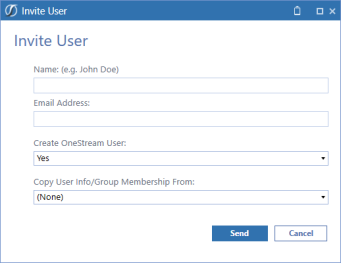
On the User Management Console page, click Invite and complete the following fields:
-
Name: Enter the user’s name.
-
Email Address: Enter a valid email address.
-
Create OneStream User: Select Yes to add the user to the OneStream Framework database.
-
Copy User Info/Group Membership From: Select to copy an individual user’s information or group information from the security user information.
-
-
Click the Send button to send the invitation.