Uninstall
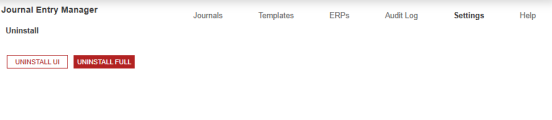
The Uninstall feature allows you to uninstall the user interface or the entire solution. If performed as part of an upgrade, any modifications that were made to standard solution objects are removed.
IMPORTANT:
The uninstall options are:
-
Uninstall UI - OneStream Financial Close removes all solutions integrated into OneStream Financial Close, including related dashboards and business rules but leaves the related databases tables.
-
Uninstall Full - OneStream Financial Close removes all the related database tables, data, dashboards, and business rules from all solutions integrated into OneStream Financial Close. Select this option to completely remove the solutions and underlying data.
CAUTION: Uninstall procedures are irreversible.
If you have an application that includes a version of OneStream Financial Close without Journal Entry Manager, you can uninstall UI and install the General Availability build, and you will receive the most recent version of Account Reconciliation Manager and Transaction Matching, and the initial version of Journal Entry Manager.
If your application includes a version of OneStream with Journal Entry Manager, a full uninstall may be required before installing the General Availability build, depending on the version you're upgrading from.
Example: If you are on OFC PV8.5.0 SV100 or PV8.5.0 SV101, you do not have to do a Uninstall Full to upgrade to PV8.5.0 SV110.
Example: If your using a version prior to OFC PV8.5.0 100 you must do an Uninstall Full.
IMPORTANT: Uninstall Full deletes all data.
If you are a user that upgraded from a previous version of Journal Entry Manager, you may receive an error message similar to the following:
Unable to open dashboard '0000_Frame_JEM_OnePlace'.
Error processing Dataset 'GetJournalEntryListForGridView'. Error executing Workspace Assembly
Service class 'Workspace.OFC.JEM.WsAssemblyFactory'.
Must specify valid information for parsing in the string. (Parameter 'value').
If this error displays, go to the Journals page and reset the parameters by clicking the Reset Parameters button. If this error still occurs, please contact OneStream Support by registering at: Support - OneStream Software