Matrix consolidation is a term commonly used when finance teams want to prepare their management and statutory financials concurrently. This prevents the need to maintain separate scenarios and processes in the system. It will usually involve running eliminations on something more than a legal entity.
In OneStream, this can mean using a User Defined (UD) dimension as part of the elimination process.
A common use case is to run eliminations between profit centers (PCs) or segments. In this example, inter-profit center eliminations will be used, but that is not the only potential use case. The need is for an elimination to occur only at the first common parent in both the legal entity and profit center hierarchies.
Entity Dimension or User Defined Dimension
There is a requirement to do eliminations on a level of detail below the legal entity/company code level. The example in this section is to generate eliminations between profit centers. The main options are Entity dimension or User Defined dimension, which are described in the following sections.
Entity Dimension Option
Include this profit center detail in your Entity dimension as base members. These will be children of the legal Entity members.
| Entity Dimension Option |
||
|---|---|---|
| Pros | Cons | |
| Business Logic | No additional logic required to get eliminations running by PC |
|
| Dimensions |
|
|
| Workflows | If the responsibility structure and workflow design are by PC, the workflow design and build can be improved. |
|
| Reporting and Matching |
|
|
| Security | Native using the Entity dimension | Requires maintenance on a PC level even if not required on that level |
User Defined Dimension Option
Include this profit center detail in a User Defined dimension.
|
User Defined Dimension Option |
||
|---|---|---|
| Pros | Cons | |
| Business Logic |
|
Requires additional development time for business logic if it is not part of a starter kit |
| Dimensions |
|
Requires the use of multiple UD dimensions (one for PC and another for PC counterparty). See UD7 - New Counterparty Profit Center. |
| Workflows | Often more closely aligns with the responsibility structure for actuals (by legal entity) |
None identified |
| Reporting and Matching |
|
Custom IC matching reports may be required for PC matching. This is a less common requirement. |
| Security | Native using the Entity dimension if security is driven by legal entity | Requires slice security, Cube Data Access security, if required at PC level, which can impact reporting performance if security is complex |
Other Design Considerations
-
Data Quality of Matrix Counterpart: All intercompany data from the source system needs to be sourced for all matrix dimensions. It will negatively impact user experience if this data is not readily and accurately available in the source system. Significant manual input is required.
-
Stability of the Matrix Dimension: Consider whether the profit center hierarchy will change regularly as relationships change. This requires significant consideration in the design phase. See Org-by-period in the User Defined Dimension.
-
New or Existing Application: The choice of solution may depend on whether this is a new implementation or an addition to an existing one. It will likely be easier to add a new User Defined dimension to an existing application rather than redevelop the Entity dimension.
-
Performance: Common design considerations of performance, data unit sizes, and number of data units apply. In addition, because of the nature of matrix consolidation, it is unlikely that the Matrix dimension can be extended because it is required for the elimination postings. Therefore, carefully consider the size and sparsity of this dimension when thinking about the performance of your design.
-
Elimination or Matching: If eliminations happen on profit center, it does not mean that month end intercompany matching must be at this level. It is important to clarify these as separate requirements.
-
Workflow: Consider the responsibility structure of the organization. It will have a big impact on the decision. If the true process (loading, locking, calculating, and certifying the data) is by profit center, then this could be a good justification for using the Entity dimension. However, it is more typical that these are based on legal entity for actuals, which makes a User Defined dimension solution more appropriate.
Option Overview
The best approach varies depending on the specific requirements. Review the benefits and considerations of each approach. Adding members to the Entity dimension creates additional overhead during consolidation because the system must run the data unit calculation sequence (DUCS), consolidate, and check the status on each Entity member. Therefore, including profit center in the Entity dimension will often be slower than using a User Defined dimension with typical data volumes.
Regardless of the approach, with the default, eliminations always occur at the first common parent in the Entity dimension. For a different approach, consider a non-matrix solution, which has separate cubes for statutory and management.
Since the Entity dimension option mostly uses system-default logic for processing and eliminating the data, the setup is straightforward. Therefore, the following information focuses on how to design for the User Defined dimension option to contain this detail and run eliminations.
Out-of-the-box View of Eliminations
If you need eliminations to run by profit center, it does not mean that you need to implement a full matrix consolidation solution. If you do not need the profit center elimination to happen at the first common parent in the PC hierarchy, out-of-the-box eliminations will suffice because you can report the eliminated data by selecting the correct combination of members, such as origin or PC.
Here is an example of the default behavior of eliminations in OneStream.
This is a profit center dimension in UD1 and an Entity dimension for the legal Entity members. In this example, all entities are using United States dollar (USD) only and are 100% owned.
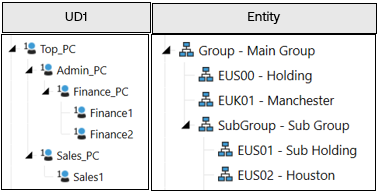
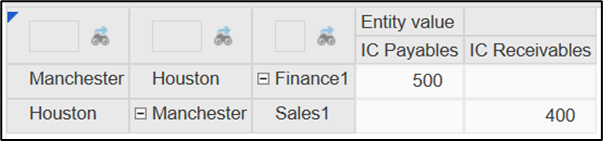
There is an intercompany transaction between the legal entities Manchester and Houston. For Manchester, it is captured in the Finance PC. For Houston, it is captured in the Sales PC.
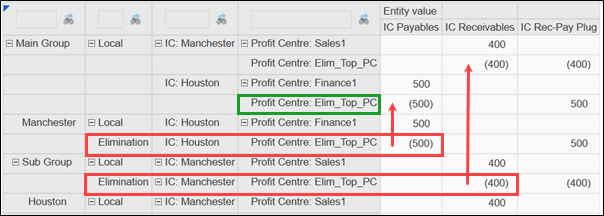
When out-of-the-box eliminations are run, the following results will display. Eliminations are in the red boxes, and consolidated results are in the blue box.
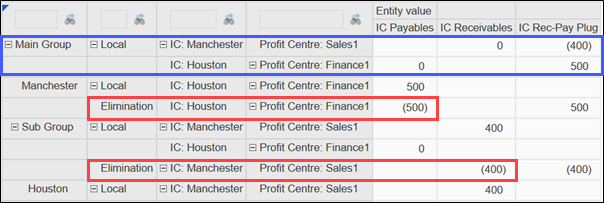
The eliminations occur at the first common parent in the Entity dimension. In this example, the first common parent is the Main Group. In UD1, the eliminations happen on the same member as the original data, so at the group level the plug amounts are by profit center.
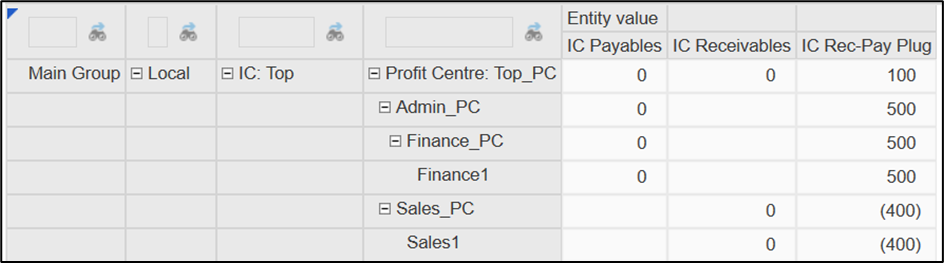
Focus on the PC dimension (UD1) at the top Main Group reporting Entity member. The aggregated difference on the plug account of the base-level profit centers for Finance1 and Sales1 is 100.
Matrix Consolidation - View of Eliminations
In this setup, you can apply matrix consolidation. With the same data, the counterparty PC for each transaction is captured.

In the following image, eliminations will happen on a new elimination member in UD1, rather than the member the data sits on, which is highlighted in the green boxes. For more information about the required elimination members, see UD1 – Profit Center.
The member where the elimination occurs represents the first common parent of the PC and Counterparty PC in the hierarchy. In this example, it is the Top_PC member in UD1.
Review this result in more detail at the Main Group entity level. In the UD1 hierarchy, the elimination does not occur until the first common parent in the UD dimension. So, at Top_PC, the data is eliminated. But, at descendant UD1 members, the data is not eliminated, for example, Admin_PC, Finance_PC, and Sales_PC.
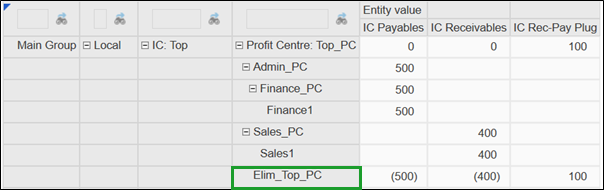
The top PC and group entity have different approaches but the same result.
Setup
The following items are configured in the matrix consolidation example.
Entity
No changes are required to the Entity dimension for matrix consolidation.
Account
No changes are required to the Account dimension for matrix consolidation. The same plug accounts can be used.
UD1 – Profit Center
Some additional elimination members are required in UD1 . UD1 is used in this example. Standard design decisions apply to any User Defined dimension.
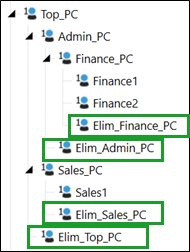
These new elimination members will be required at every point an elimination may happen, so you can see that this can add a large number of members to the existing hierarchy.
A common naming convention is often used to allow the system to derive where to post the elimination. In this case, it is the parent member name with the Elim_ prefix. Alternatively, you could use text fields to store this information. Either way, the logic will rely on this being updated accurately and consistently.
TIP: Ensure your consolidation logic provides useful error messages if it finds that an elimination member does not exist or is misconfigured.
UD7 - New Counterparty Profit Center
A new dimension is needed to capture counterparty PC information. Like the Intercompany dimension in OneStream, this can be, and typically is, a flat list of the base counterparties.
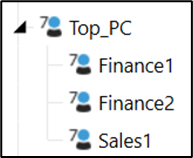
All relevant intercompany data now needs to be analyzed by this dimension. Input forms and transformation rules will need to be updated.
In data models where almost all User Defined dimensions are already in use, this element can be challenging and requires consideration. UD7 is used in this example. The standard design decisions apply to any User Defined dimension. This dimension is used to capture the counterparty, so if your design already uses lots of dimensions, you may be able to combine this with other supplementary data or use UD8. However, this will require additional consideration in your dynamic reporting design.
TIP: Consider how this dimension will be maintained. It is important for the logic that all members exist with the same naming in this counterparty dimension. Consider whether the counterparty dimension should be automated to align with the main profit center dimension.
Business Logic
Unlike the Entity dimension, all parents in a User Defined dimension are calculated on-the-fly. This approach requires additional eliminations to be calculated.
You will need to store your new matrix consolidation logic somewhere. In this case, it is a business rule attached to the cube, but it could also be attached to a member formula.

TIP: You do not need to turn on a custom consolidation algorithm on the cube to achieve a matrix consolidation result. Consider the overall requirements and design.
Reporting
Custom reports need to be developed to enable intercompany matching and reporting on the resulting eliminations. If you already do eliminations like this, specifications should already exist that can be designed for this purpose. If not, you will need to understand matrix consolidation when you build reports and Quick Views or run legal entity-based reports with top for profit centers.
TIP: You can use data set business rules to help efficiently gather data for interactive dashboards and reports.
Business Logic
Consolidation Algorithm
When a matrix consolidation requirement exists, it has been commonly observed that consultants will turn on the custom consolidation algorithm for each relevant cube. However, this stores the share data, so it has a negative impact on consolidation performance and database size.
Before you use the custom algorithm, consider calculating the matrix elimination adjustments during the calculation pass of C#Elimination within a UD member (potentially within your data audit dimension). This enables you to remain on the standard or org-by-period algorithm. Within this member, you can update the standard eliminations with the profit center detail.
You may have other requirements to use the custom algorithm. Determine the approach for matrix eliminations in the context of the overall design.
TIP: Consider whether matrix eliminations are required for all processes and scenarios, and ensure it is only running on those that require it.
Useful Functions
The general approach for writing a matrix consolidation rule is to check that the elimination only occurs at the first common parent. Other than that, it follows standard OneStream rule writing techniques, such as using data buffers.
The following functions can be useful.
| Function | Comment |
|---|---|
| api.Members.GetFirstCommonParent() | Use this function to check both the entity and PC parents to see if they are common to the IC or counterparty member. |
| api.Members.IsDescendant() | This does not check whether a descendant has a consolidation percentage greater than zero. So, if doing org-by-period, this may need additional consideration. |
| api.Entity.PercentConsolidation() | Use this function to check if entity is being consolidated. Ensure you only pass valid parent/entity combinations into the function. |
Example Rule
The following rule is an example to demonstrate an approach to implement matrix consolidation. If you use it as a starting point, adapt and thoroughly test it before implementation.
The example takes the following approach:
-
It retrieves a data buffer of the system-generated eliminations.
-
It checks if the record is a new elimination.
-
It reallocates the elimination (both intercompany and plug account entry) to the correct profit center.
-
It clears the duplicate system elimination as No Data.
-
It saves the results.
This should be assigned to the cube when using the standard or org-by-period consolidation algorithm. It reallocates the out-of-the-box eliminations to the relevant UD member.
With some reconfiguration of the dimensions and names referenced in the rule, it should work with the setup described.
Imports System
Imports System.Collections.Generic
Imports System.Data
Imports System.Data.Common
Imports System.Globalization
Imports System.IO
Imports System.Linq
Imports Microsoft.VisualBasic
Imports OneStream.Finance.Database
Imports OneStream.Finance.Engine
Imports OneStream.Shared.Common
Imports OneStream.Shared.Database
Imports OneStream.Shared.Engine
Imports OneStream.Shared.Wcf
Imports OneStream.Stage.Database
Imports OneStream.Stage.Engine

Namespace OneStream.BusinessRule.Finance.MatrixElim
    Public Class MainClass
        Public Function Main(ByVal si As SessionInfo, ByVal globals As BRGlobals, ByVal api As FinanceRulesApi, ByVal args As FinanceRulesArgs) As Object
            Try
                Select Case api.FunctionType
                    Case Is = FinanceFunctionType.Calculate
                        If api.Pov.Cons.MemberId = DimConstants.Elimination Then

                            'Matrix consolidation
                            'Moves system-generated eliminations to first common parent elim members In UD
                            'Moving eliminations will prevent original value and elimination from netting, causing duplicate eliminations at each level
                            'Rule also clears these duplicate eliminations
                            'UD1 = main hierarchy (ProfitCentreDetail). UD7 = partner hierarchy (PC_Interco)

                            'Get system-generated eliminations
                            Dim sourceDb As DataBuffer = api.Data.GetDataBufferUsingFormula("RemoveZeros(A#All)",,False)
                            If sourceDb IsNot Nothing AndAlso sourceDb.DataBufferCells.Count > 0 Then
                                Dim currentElimDb As New Databuffer

                                'Determine if consolidation algorithm is org-by-period
                                Dim povConsAlgorithm As ConsolidationAlgorithmType = api.Cubes.GetCubeInfo().Cube.ConsAlgorithmType
                                Dim isOBP As Boolean = False
                                If povConsAlgorithm = ConsolidationAlgorithmType.OrgByPeriodElimination OrElse povConsAlgorithm = ConsolidationAlgorithmType.StoredShareAndOBPElimination
                                    isOBP = True
                                End If

                                For Each sourceCell As DataBufferCell In sourceDb.DataBufferCells.Values
                                    '(1) Move system-generated eliminations to first common parent elim members In UD

                                    '(1a) Record is new elim only if IC entity is not a descendant of current entity
                                    Dim icPartner As String = sourceCell.GetICName(api)
                                    Dim isICDescendant As Boolean

                                    'Create dictionary to hold results of IsDescendant check. Prevents repeating the test whenever the same IC partner is encountered
                                    Dim descDictionary As New Dictionary(Of String, Boolean)

                                    'Check if IC partner has previously been encountered. If so, use previous IsDescendant results. If not, perform new IsDescendant check.
                                    If Not descDictionary.TryGetValue(icPartner, isICDescendant)
                                        If Not isOBP Then
                                            'Standard algorithm
                                            isICDescendant = api.Members.IsDescendant(api.Pov.EntityDim.DimPk, api.Pov.Entity.MemberId, sourceCell.DataBufferCellPk.ICid)
                                        Else
                                            'Org-by-period algorithm
                                            isICDescendant = IsDescendantWithNonZero(si, api, api.Pov.EntityDim.DimPk, api.Pov.Entity.MemberId, sourceCell.DataBufferCellPk.ICid)
                                        End If
                                        'Save results of new IsDescendant check
                                        descDictionary.Add(icPartner, isICDescendant)
                                    End If

                                    '(1b) If record is new elim, move to first common parent elim member
                                    If Not isICDescendant Then
                                        'Get first common parent of current record
                                        Dim ud1Pk As DimPk = api.Dimensions.GetDim("ProfitCentreDetail").DimPk
                                        Dim topMemberId As Integer = api.Members.GetMemberId(dimTypeId.UD1, "Top_PC")
                                        Dim partnerId As Integer = api.Members.GetMemberId(dimTypeId.UD1, sourceCell.GetUD7Name(api))
                                        Dim commonParent As Member = api.Members.GetFirstCommonParent(ud1Pk, topMemberId, sourceCell.DataBufferCellPk.UD1Id, partnerId)
                                        If commonParent.Name.Length = 0 Then
                                            Throw New System.Exception($"No common parent found for member {sourceCell.DataBufferCellPk.GetUD1Name(api)} and partner {sourceCell.DataBufferCellPk.GetUD7Name(api)}")
                                        End If

                                        'Copy record and update UD to the UD elimination member
                                        Dim targetCell As New DataBufferCell(sourceCell)
                                        Dim elimMember As Integer = api.Members.GetMemberId(DimTypeId.UD1, $"Elim_{commonParent.Name}")
                                        If elimMember = -1 Then
                                            Throw New System.Exception($"Elimination member for common parent {commonParent.Name} not found.")
                                        End If
                                        targetcell.SetUD1(api,$"Elim_{commonParent.Name}")
                                        currentElimDb.SetCell(si, targetCell, True)
                                    End If

                                    '(2) Clear duplicate eliminations
                                    Dim nodataCell As New DataBufferCell(sourceCell)
                                    nodataCell.SetData(0,datacellexistencetype.NoData, nodataCell.CellStatus.StorageType)
                                    currentElimDb.SetCell(si, nodataCell, False)
                                Next

                                Dim di As ExpressionDestinationInfo = api.Data.GetExpressionDestinationInfo("")
                                api.Data.SetDataBuffer(currentElimDb,di)
                            End If
                        End If
                End Select

                Return Nothing
            Catch ex As Exception
                Throw ErrorHandler.LogWrite(si, New XFException(si, ex))
            End Try
        End Function

        'Checks if a given entity is a descenant with a non-zero consolidation %
        Public Function IsDescendantWithNonZero(ByVal si As SessionInfo, ByVal api As FinanceRulesApi, ByVal dimPK As DimPk, ByVal ancestorMemberID As Integer, ByVal memberID As Integer) As Boolean
            Try
                Dim isDescendant As Boolean = False
                If ancestorMemberID = memberID Then Return False

                Dim children As List(Of Member) = api.Members.GetChildren(dimPK, ancestorMemberID)
                If (Not children Is Nothing) And children.Count>0 Then
                    For Each childMember In children
                        If api.Entity.PercentConsolidation(childMember.MemberId, ancestorMemberID) <> Decimal.Zero
                            If childMember.MemberId = memberID
                                isDescendant = True
                                Exit For
                            End If
                            isDescendant = IsDescendantWithNonZero(si, api, dimPk, childMember.MemberId, memberID)
                            If isDescendant Then
                                Exit For
                            End If
                        End If
                    Next
                End If

                Return isDescendant

            Catch ex As Exception
                Throw ErrorHandler.LogWrite(si, New XFException(si, ex))
            End Try
        End Function

    End Class
End Namespace
Org-by-period in the User Defined Dimension
If you change the profit center structure, the Entity dimension has built-in tools to handle org-by-period so that entities can have relationship properties that vary by time period. Data is also stored on parent entities, which helps in this org-by-period. The User Defined dimension does not have the same functionality. So, if you move a member, that member is moved for all history. If you duplicate a member, the values are duplicated. This depends on the aggregation weight, but that cannot be varied by time.
If a profit center needs to change parents one month, consider these options:
-
Change the Main Hierarchy: The old view will no longer be visible. The added complexity is that the eliminations for prior periods will occur in the wrong place in the UD hierarchy from a historical point of view unless a consolidation is rerun on all of those periods. If you rerun the consolidation on prior periods, all of your results will change, although not at the top level as long as nothing else has changed. This implies that the elimination will correctly display the elimination after the change. Historical data will not be kept for the reconsolidated periods.
-
Create Alternate Hierarchies (for example, Top_2023 and Top_2024): Create new hierarchies with unique parents to preserve the old hierarchy. As with the previous option, reconsolidation of prior periods is required to view historical data in the same format. However, if the data is only required in the new format for the future, reconsolidation of prior periods can be avoided.
TIP: For each alternate hierarchy in which you run matrix eliminations, the eliminations will be duplicated. Therefore, your business logic should allow you to configure, by time period and scenario, which hierarchies are eliminated to ensure only the necessary calculations are run. This could be done, for example, through tags on text fields of the members.
It is not a common scenario, but it is something to consider during the requirements gathering and design.


