The Database Administration feature allows customers to copy database tables and edit views from the System Database Page in the OneStream Windows Application. Administrators and solution designers can use it to maintain and deploy custom tables without direct SQL database access.
Database Administration tasks are advanced and intended for users with extensive database expertise.
Key Features
• Ability to Copy Database Tables and Views
• Modify view definition scripts to support environment migrations, database updates, and application name changes
• Rename and Delete Database Tables and Views
• Edit application references in the StageBIBlendInformation table to support environment migrations and application name changes
Configure Security
Administer Database requires Enable Database Administration to be enabled for the environment, as well as application-level and system-level provisioning. These roles allow administrators to limit access to only the required databases in a OneStream environment.
The Administer Database can be used in:
-
Application Databases
-
System Database
-
External Databases
When using Database Administration:
-
Application databases can be managed only within the currently logged-in application. Tables and views cannot be copied across environments or applications
-
Deleting tables is allowed only on tables containing: _Copy or _Delete
-
Application-level and system-level security roles apply only to databases where Enable Database Administration = True is set in the OneStream Application Server Configuration file
Enable Database Administration
Database Administration is intended for users with extensive database expertise and is available only by request through OneStream Support. To enable, ask OneStream Support to update the Database Server Connections collection by setting Enable Database Administration = True for each required database server connection in each environment.
With Database Administration enabled:
-
When applied to the OneStream Database Server, this setting enables Database Administration for all OneStream applications and the System database (Framework) in the environment
-
Additional database connections are managed by OneStream Cloud Operations and must be enabled in each environment where Database Administration is required
-
Enable Database Administration = True makes the database available as a valid destination when copying tables and views
-
Enable Database Administration = True overrides Database Security settings configured on the System Configuration Page. When youaccess the Database Page, this setting grants full access, maintenance privileges, and permission to view data
Application Security Roles
Administer Application Database: Default = Nobody: This application security role is set for each application and allows youto update the StageBIBlendInformation reference and Copy, Rename, or Delete application database tables and views..
System Security Roles
-
Administer System Database: Default = Nobody: This System Security Role enables the ability to copy, rename, and delete System Database Tables.
-
Administer External Databases: Default = Nobody: This system security role allows you to copy, rename, and delete OneStream-managed external database tables. It does not apply to custom external database connections created on the System Configuration Page.
Database Access Group Security or System Configuration Page
Database Security provisioning on the System Configuration page grants limited permissions that allow tables to be used as copy sources.
Users provisioned with AdministerApplicationDatabase, AdministerSystemDatabase, or AdministerExternalDatabase for a database with Enable Database Administration enabled can use other databases in the environment as copy sources when they also have the required source-database access roles, such as Access Group for Platform Tables or Access Group for Ancillary Tables.
Administer Database Tasks
These are tasks the administrator can perform.
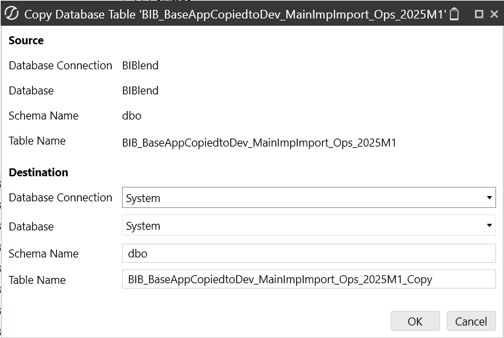
Copy Tables
You can copy tables from any database. Destination databases must be in the current environment and the active application session. Copying tables across environments or to other applications is not supported.
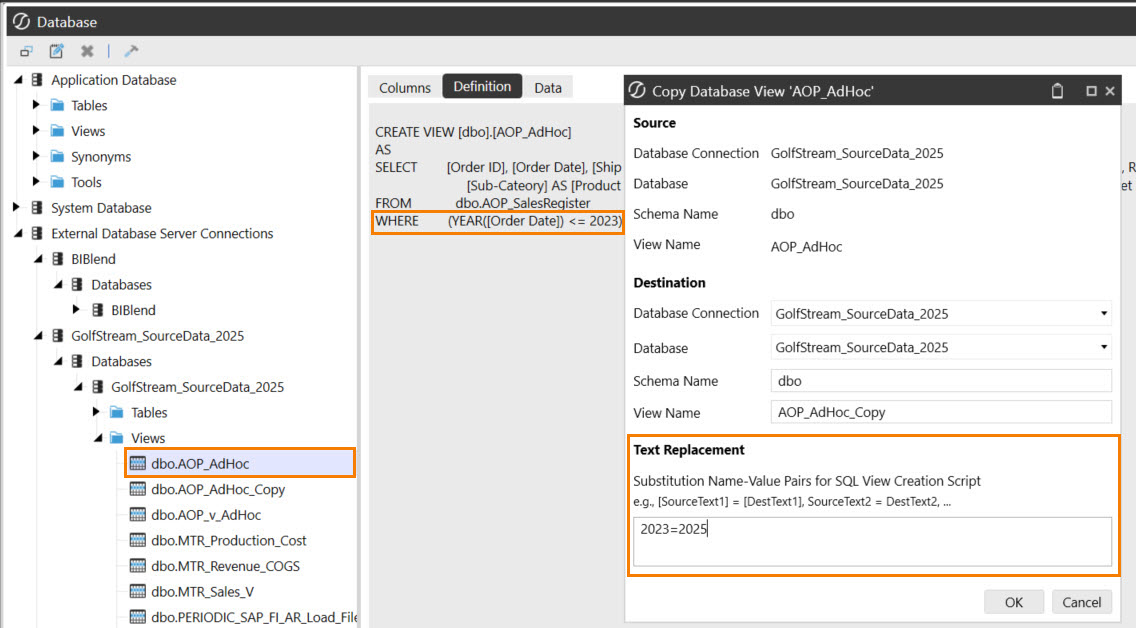
Copy Views and Modify Definitions
You can copy views from any database. Destination databases must be in the current environment and the active application session. Copying views across environments or to other applications is not supported. When a view definition requires a different reference, use the Text Replacement field to update the script without direct SQL database access.
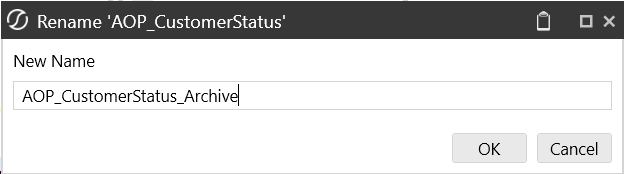
Rename and Delete Tables and Views
You can rename tables and views. Only tables with names that include _copy or _delete can be deleted.
Fix App Names in StageBiBlendInformation
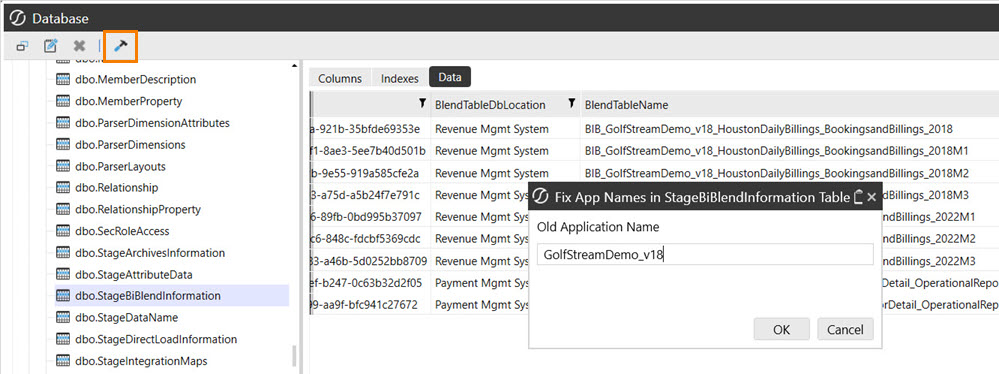
This task renames the application reference in the StageBiBlendInformation platform table and related BI Blend database tables. To use, select the StageBiBlendInformation table; then the rename option becomes available.
Use this task to reassign a BI Blend database to another application, such as when creating or managing application copies.
The Fix App Names text box replaces the entered text with the name of the current application.