Dynamic Dashboards allow you to modify components within the dashboard as well as modifying the dashboard itself.
Create a Dynamic Dashboard Service Type assembly file after the Service Factory file has been created. Here is an example of a Service Factory file referencing a Dynamic Dashboard Service type in C#:
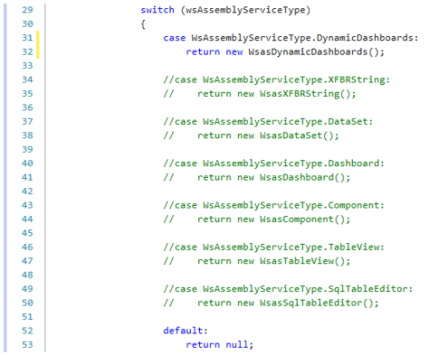
Given the changes in the code, configure the dashboard service file in the following way:
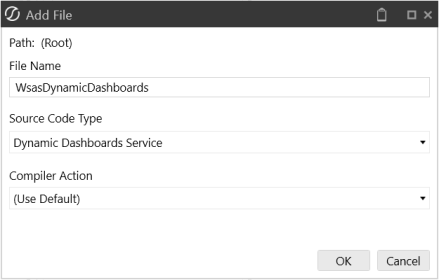
NOTE: The file name should match the return function in the Service Factory file.
The example below shows embedded components that have not been created manually in the workspaces interface but are generated by the assembly file.
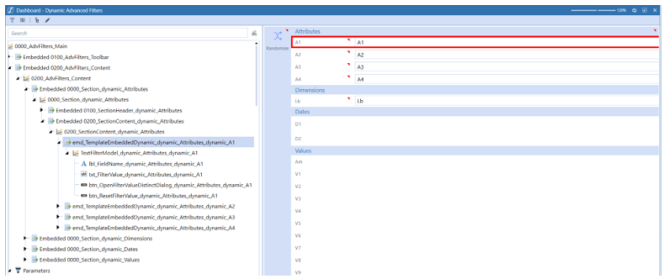
Before writing the assembly, ensure the Dashboard Type property is set to Embedded Dynamic. The rule will not run if you forget this step. This is also where you should ensure the Workspace Assembly Service property is set to the Service Factory assembly file.
There is no special syntax required for referencing this service type.
If you created Dynamic Dashboard Service Type Assembly Files using VB.Net before version 9.0, you need to manually add the new GetDynamicCubeViewForDynamicComponent function to the source code or you will receive this error:
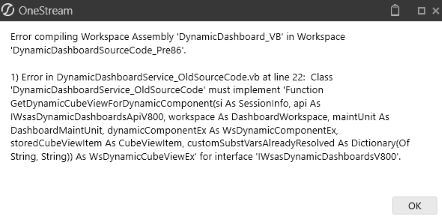
To update and compile pre-Version 9.0 VB.Net Dynamic Dashboard Service files, complete the following steps:
-
Copy the following lines of code to add the GetDynamicCubeViewForDynamicComponent method.
CopyGetDynamicCubeViewForDynamicComponent VB.Net Code
Public Function GetDynamicCubeViewForDynamicComponent(ByVal si As SessionInfo, ByVal api As IWsasDynamicDashboardsApiV800, ByVal workspace As DashboardWorkspace, _
        ByVal maintUnit As DashboardMaintUnit, ByVal dynamicComponentEx As WsDynamicComponentEx, ByVal storedCubeViewItem As CubeViewItem, _
        ByVal customSubstVarsAlreadyResolved As Dictionary(Of String, String)) As WsDynamicCubeViewEx Implements IWsasDynamicDashboardsV800.GetDynamicCubeViewForDynamicComponent
        Try

            If api IsNot Nothing Then
                Return api.GetDynamicCubeViewForDynamicComponent(si, workspace, dynamicComponentEx, storedCubeViewItem, String.Empty, Nothing, TriStateBool.Unknown, WsDynamicItemStateType.Unknown)
            End If

            Return Nothing
        Catch ex As Exception
            Throw New XFException(si, ex)
        End Try
End Function -
Paste the code in the Dynamic Dashboard Service File that is producing the error. You can paste the full function after the GetDynamicParametersForDynamicComponent method. This is after line 93 in the original source code.
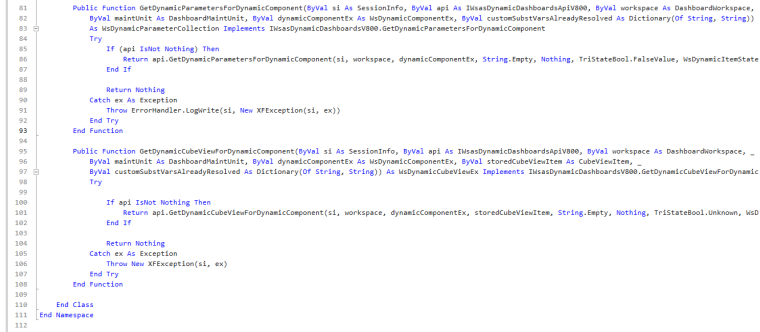
-
Select Compile Assembly to compile the Assembly File.
IMPORTANT: You can utilize new functionalities within Platform Release 8.2 and later versions for service types in C#. While new coding options will work successfully in C#, these new functionalities in Platform Release 8.2 or later may not be compatible with VB.Net.


