You can schedule data management jobs to create detail items from Transaction Matching. See the Task Scheduler section of the Design and Reference Guide.
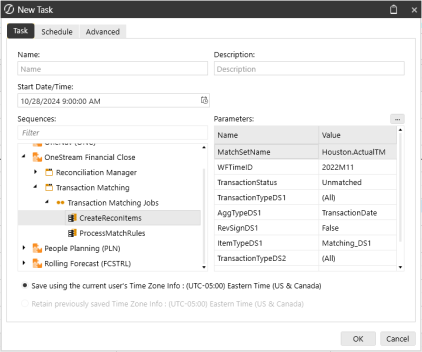
Available parameter names, including default values and valid values, are listed below. Parameters with an asterisk are required.
NOTE: Use the following format to define a MatchSetName value: Workflow Profile.Scenario. For example, in the previous image, the MatchSetName value is Houston.ActualTM. The Workflow Profile is Houston and the Scenario is ActualTM.
|
Parameter |
Default Value |
Valid Value |
|---|---|---|
| MatchSetID* (default) or MatchSetName* | ||
| WFTime* (default) or WFTimeID* |
||
| TransactionStatus* | Unmatched, Unmatched as of Period End, Matched | |
| MatchReasonCode | (All) | Any Reason Code name |
| MatchPeriod | Future | (All), Future, Current |
| ImportPeriod | (All) | Any WFTimeID |
| TransactionTypeDS1 | (All) | (All), Selected, (None) |
| ItemNameDS1 | Substituted Value | |
| ReferenceOneDS1 | Substituted Value | |
| ReferenceTwoDS1 | Substituted Value | |
| AggTypeDS1 | (None) | (None), Total, ItemName, TransactionDate |
| RevSignDS1 | FALSE | True/False |
| ItemTypeDS1 | Matching_DS1 | Any Item Type |
| TransactionTypeDS2 | (All) | (All), Selected, (None) |
| ItemNameDS2 | Substituted Value | |
| ReferenceOneDS2 | Substituted Value | |
| ReferenceTwoDS2 | Substituted Value | |
| AggTypeDS2 | (None) | (None), Total, ItemName, TransactionDate |
| RevSignDS2 | FALSE | True/False |
| ItemTypeDS2 | Matching_DS2 | Any Item Type |
| TransactionTypeDS3 | (All) | (All), Selected, (None) |
| ItemNameDS3 | Substituted Value | |
| ReferenceOneDS3 | Substituted Value | |
| ReferenceTwoDS3 | Substituted Value | |
| AggTypeDS3 | (None) | (None), Total, ItemName, TransactionDate |
| RevSignDS3 | FALSE | True/False |
| ItemTypeDS3 | Matching_DS3 | Any Item Type |


