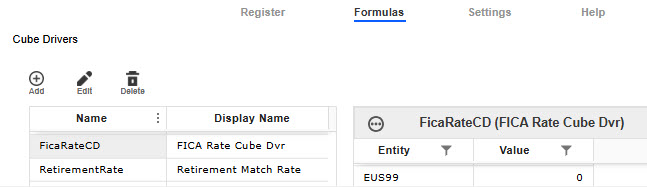
Cube Drivers
Cube Drivers take the dimensionality of cubes used across OneStream and enables you to utilize their information for formula building and plan data creation within the Line Item Modeling solution. You can connect driver values from a Cube View to the solution by adding a Cube Driver. The Cube Driver is dynamic and changes based on any Cube View changes. When creating a Cube Driver, you can select the Variable option for Time Frequency to track values across multiple months and years to view all potential results from different time periods or you can select Fixed which will take the value of the specific month and year the driver is stored in.
NOTE: A Cube Driver can be utilized across multiple years in the plan calculation, however, the Preview table of the Cube Driver only displays values for a single year.
On the Cube Drivers page, Cube Driver Names and Display Names are stored in the table on the left and the associated cube driver values are presented in the table on the right. When you select a Cube Driver from the table on the left, the cube driver values will display in the table on the right. A Cube Driver may be tied to multiple entities, each with unique values.
NOTE: When you import a configuration, Cube Driver values won't display in the preview table until you add Register data and preview the new data. Your Cube Driver is trying to compare values that are in the Register against values that are in a Cube so data needs to exist in the Register for that comparison to happen.
IMPORTANT: Any attribute named in the solution, such as Register Field Names, Accounts, Global Drivers, Cube Drivers and Formula Names, must be unique from each other.
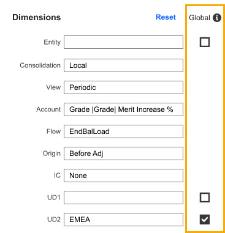
When adding or editing a cube driver, you can use the Global checkbox to control whether a cube driver applies universally or only to specific dimensions. When selected, the driver is applied to all Register records, and the corresponding dimension column is removed from the preview. If left unchecked, the driver applies only to the selected dimension, and those columns remain visible in the preview. This setting ensures flexibility in managing calculations and configurations. Global checkboxes only display if a Member Definition is assigned in the Register Definition for a given Dimension.
NOTE: Global selections are preserved when exporting configuration files.