View Plan
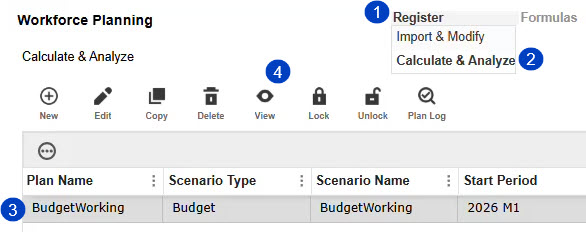
To view a saved plan, follow the legend and corresponding instructions:
-
Hover your cursor over the Register menu.
-
In the drop-down menu, select Calculate & Analyze.
-
Selected a previously created plan.
-
Click the View button.
A new page opens and you can view the calculated data of the selected plan. You can use the Select Columns button to filter and view all the Register columns you have access to within a selected plan. Use the Filter Results button to create a custom filter. See Manage Filters.

 of Select columns_189x304.jpg "Select Columns")
NOTE: If you do not have security access to calculate data or if all Register data is deleted, the CALCULATE button is not visible on the View Plan page. The CALCULATE button is unavailable if the plan is locked.


