Anomaly Detection
IMPORTANT: Anomaly Detection requires SensibleAI Studio, a separately priced solution, and version 9.1 or greater.
Anomaly Detection identifies data points that deviate from typical patterns or behaviors. These anomalies manifest as outliers or exceptional events that distinguish themselves from the typical data set.
Types of anomalies identified during the reconciliation process:
-
Reconciliation Balance: Analyzes the degree of abnormality for an account balance based on prior values. The detector looks to identify if there are abnormal increases or decreases based on the reconciliation balance in prior periods.
-
Aged Item Commentary: Reviews reconciliation detail items that have exceeded the specified aging thresholds for your Aging Periods and verifies if they include commentary.
-
R-Doc Sparsity: Checks how often "R-Docs" (supporting documents at the reconciliation-level) are consistently attached to reconciliations period over period.
-
Reconciliation Detail Text Field Length: Looks at the average text length entered in the ItemName, Item Comment, Ref 1, and Ref 2 fields for Detail Items in a reconciliation.
-
Auto-Manual Reconciliation Ratios: Measures each reconciliation and checks whether they were automatically reconciled versus manually reconciled in the prior period, and analyzes how the ratio changes.
-
Number of reconciliation detail items: Monitors how many individual detail items are included in each reconciliation period over period.
-
Number of I-items: Focuses on the count of "I-items" (manual adjustments). It tracks how consistently these items display, calling out sudden spikes or dips.
-
I-Doc Sparsity: Evaluates how consistently "I-Docs" (supporting documentation for manual or "I-Item" entries) are attached to reconciliation detail items over time. It tracks each period's percentage of I-Items that have an accompanying I-Doc and flags sudden decreases, suggesting insufficient or missing documentation compared to typical patterns.
-
Balance Check I-Items: Verifies if the current period has an I-Item and a B-Item linked to a reconciliation. You can reference the previous period, but the rule applies only to the current period.
-
Repetitive Rejections: Detects when a reconciliation is rejected multiple times over a span of periods or within a single cycle.
-
Sign Difference: Identifies instances where the sign (positive or negative) of a reconciliation's balance is different than prior periods.
-
Fluctuating Risk Level: Tracks how the assigned risk ratings of reconciliations change over time. It detects large or erratic swings in the risk level assigned to a reconciliation.
-
Security:
-
Number of Approver Changes: Looks for changes in the number of approvers required for a reconciliation. It flags reconciliations that have swings in the number of a approvers during the current period compared to prior periods.
-
Certifications
Certifications are customizable text that are presented to users with the Preparer or Approver roles when a reconciliation is completed and approved.

Role: The role of Preparer or Approver for the certification.
NOTE: The Approver Certification is presented for all approval levels.
Message: The certification message presented to the Preparer or Approver when completing or approving reconciliations.
Active: By default, this is set to True. If False, the certification is not displayed when completing or approving reconciliations.
Comment Required: By default, this is set to True. If False, comments are not required, but can optionally be added when completing or approving reconciliations. Comments are displayed in the Status and Approval History – Detail section.
Critical Anomaly Resolution Required: When enabled, critical unresolved anomalies must be resolved before the reconciliation can be certified.
Update User: The ID of the user who created or modified the certification settings.
Update Time: The date and time the certification settings were created or modified.
Critical Anomaly Resolution Required
Critical Anomaly Resolution Required enables OneStream Administrators and Solution Administrators to require action on critical unresolved anomalies by Preparers or Approvers.
When Critical Anomaly Resolution Required is enabled and Certification is Active, Preparers and Approvers must address critical unresolved anomalies before the reconciliation can be certified.
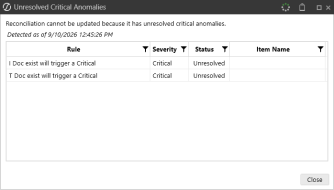
When Critical Anomaly Resolution Required is not enabled and Certification is Active, Preparers and Approvers can proceed with certification and critical unresolved anomalies are marked as Acknowledged. Approvers can see all anomalies in this dialog box except for anomalies that have been Auto-Resolved.
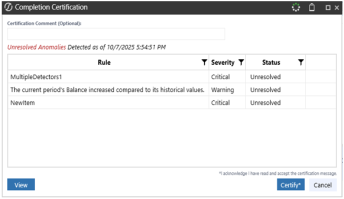
Mass Actions for Critical Anomaly Resolution Required
When Critical Anomaly Resolution Required is not enabled and Certification is Active and if two or more reconciliations are selected, Preparers and Approvers can prepare and/or approve reconciliations with anomalies in mass. Critical unresolved anomalies are marked as Acknowledged.
When Critical Anomaly Resolution Required is enabled and Certification is Active, if two or more reconciliations are selected and there are critical unresolved anomalies on any of the selected reconciliations, Preparers and Approvers receive the following message:
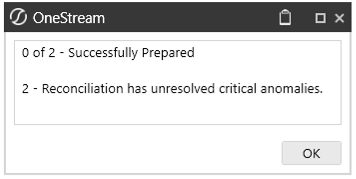
TIP: When there are no critical unresolved anomalies in the selected reconciliations when Critical Anomaly Resolution Required is enabled and/or certification is inactive, Preparers and Approvers can prepare and/or approve reconciliations with anomalies in mass.

