Preview Reconciliations
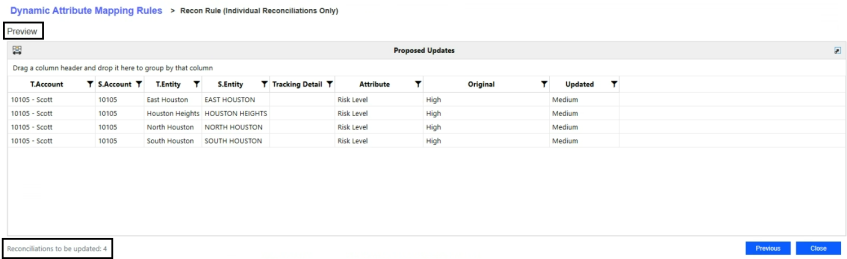
After setting the filter criteria and reconciliation attributes, you can preview active and inactive rules and the potential impacts of attribute updates to the corresponding reconciliations while creating rules in the Proposed Updates grid.
If previewing an inactive rule, the following message displays:

The Proposed Updates grid displays a list of reconciliations that have passed validation and are eligible for updates. It includes the following columns:
-
T.Account
-
S.Account
-
T.Entity
-
S.Entity
-
Tracking Detail
-
Attribute
-
Original
-
Updated
The Proposed Updates grid also highlights the number of reconciliations to be updated.
NOTE: If the Scheduled Start Date is set for a future period, no results will display in Preview, and a preview file will not be generated.
Validations
Administrators and Solution Administrators can access the Temp folder to review summary files, view how many reconciliations were updated, or understand why reconciliations were not updated (view applicable validations). Summary files can be created for Preview and for when rules are Run.
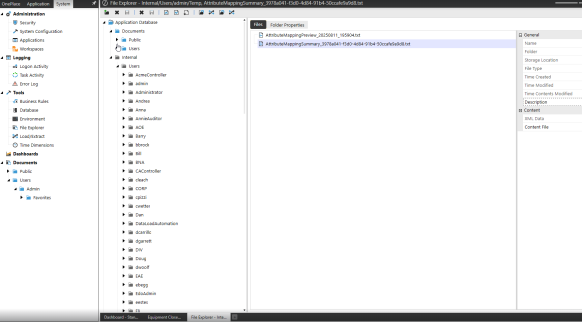
To view the summary file:
-
Click the System tab.
-
Under Tools, select File Explorer.
-
Go to Application Database > Internal > Users to view the list of users.
-
Select your username.
-
Click Temp Folder.
List of Current Validations when Assigning Attributes
Existing validations are executed in the background upon Preview and only display the list of reconciliations eligible for updates.
Reconciliation and Group Reconciliation
-
Unexplained Limit
-
Valid Decimal Value
-
-
AutoRec Limit
-
Valid Decimal Value
-
-
Preparer Workday Due
-
Valid numeric value
-
Less than or equal to Approver Workday Due
-
-
Approver Workday Due
-
Valid numeric value
-
-
Custom Attributes
-
Less than 50 characters
-
-
Time Based Attributes
-
Cannot update if Reconciliation is prepared
-
-
Primary Roles
-
No user assigned to multiple roles
-
-
Access Group
-
User must be a OneStream Administrator, Reconciliation Global Admin, or the Local Admin of the Access Group being assigned to the Account Group
-
Reconciliation Only
-
Account Group
-
Account Group is Prepared
-
Account Group has been prepared for the current time period
-
-
MC Enabled and CanOverrideDetail
-
Cannot add reconciliation to the group because it enables overrides and the FX rate does not exist for Local Currency: {childCurrency} -> {groupCurrency}. For example, USD to CAD.
-
Cannot add reconciliation to the group because it enables overrides and the FX rate does not exist for Account Currency: {childAcctCurrency} -> {groupAcctCurrency}. For example, USD to CAD.
-
-
Not MCEnabled and Local Currency does not match
-
Account Group Local Currency does not match
-
-
Has T or S Items
-
Reconciliations with T or S items cannot be added to a Group
-
-
Warning
-
Attributes are overridden with the selected Account Group attributes
-
-
Rec being removed from a group and Has T or S Items
-
Reconciliations with T or S items cannot be removed from a Group
-
-
-
Reconciliation assigned to Group
-
"Preparer", "Approver1", "Approver2", "Approver3", "Approver4", "FKAccessGroupName", "FKNotificationMethodID"
-
Must update attributes at Account Group level. Cannot update attributes of a child reconciliation except, Account Group, BalCheck WF Profile, and Account Currency
-
-
"Required", "MCEnabled", "ReconcilingCurrencyLevel", "ApprovalLevels", "RiskLevel", "ProperSign", "UnexplainedLimit", "CanOverrideDetail", "RequireSupportForOverride", "AllowAutoPullForward", "FkAutoRecRuleID", "AutoRecLimit", "FkBalanceCheckLevelID", "PrepareRule", "PreparerWorkdayDue", "ApproverWorkdayDue", "Frequency", "FKTemplateID", "CustomAttributes"
-
Must update attributes at Account Group level. Cannot update attributes of a child reconciliation except Account Group, BalCheck WF Profile, and Account Currency
-
-
Account Currency and McEnabled and CanOverrideDetail and No FX Rate exist for currencies
-
Cannot update Account Currency because the group enables overrides and the FX rate does not exist for: {childAcctCurrency} -> {groupAcctCurrency}. For example, USD to CAD.
-
-
Warnings
-
BalCheckLevel = (Tracking Level) the BalCheck WF Profile = Unassigned
-
"The BalCheck WF Profile must be assigned when the BalCheck Level is set to (Tracking Level)
-
-
BalCheck WF Profile Not Unassigned and BalCheckLevel <> (Tracking Level)
-
The BalCheck WF Profile is ignored and the BalCheck WF Profile is used from the Account Group
-
-
-
Group Reconciliation Only
-
Workflow Profile
-
Not empty
-
-
T.Account
-
Not empty
-
-
T.Entity
-
Not empty
-
-
MC Enabled
-
All child reconciliations must have same Local Currency
-
-
Local Currency
-
Local Currency can only be updated if the Account Group is Multi-Currency Enabled or no child reconciliations have been assigned to the Account Group
-
-
Warnings
-
BalCheck Level = Tracking Level
-
The BalCheck WF Profile is ignored when the BalCheck Level is set to (Tracking Level) and the BalCheck WF Profile of the child reconciliation is used
-
-
BalCheck WF Profile NOT Unassigned
-
The BalCheck WF Profile is ignored when the BalCheck Level is set to (Tracking Level) and the BalCheck WF Profile of the child reconciliation is used
-
-
BalCheck WF Profile = Unassigned and BalCheck Level NOT Tracking Level
-
The BalCheck WF Profile must be assigned when the BalCheck Level is not set to (Tracking Level).
-
-


