Reconciliation Attributes
The Set Reconciliation Attributes page enables you to define rule attributes and dynamically make updates based on the Rule Type selected.
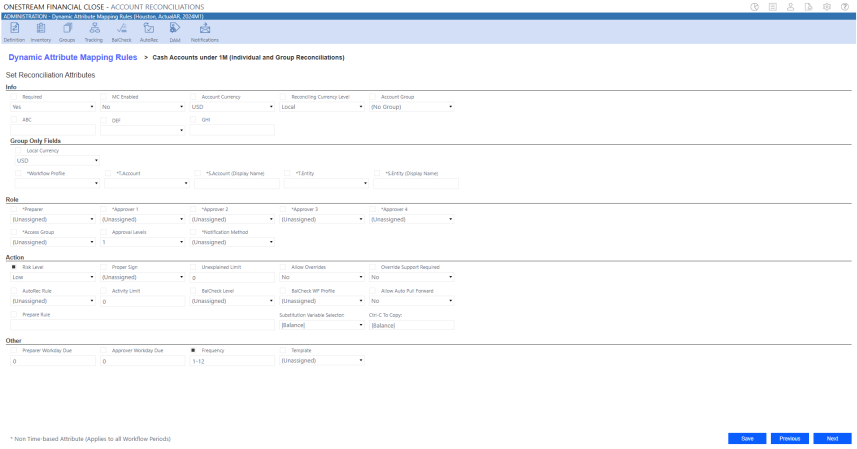
IMPORTANT: The Group Only Fields section will not display when setting attributes for an Individual Reconciliation.
Audit Log
The Audit Log captures attribute updates to reconciliations. To identify the rule responsible for an attribute update during reconciliation, see the Rule column. The Rule column is applicable to the following audit log types:
-
Time-based Attributes
-
Security Roles (Non-time based)
-
Account Groups (Non-time based)
The User column displays the last known user who executed the rule. Additionally, when multiple rules are executed in a specific order and similar fields are updated, the last rule indicates the final update. The Audit Log also notes original and updated values in their respective columns.
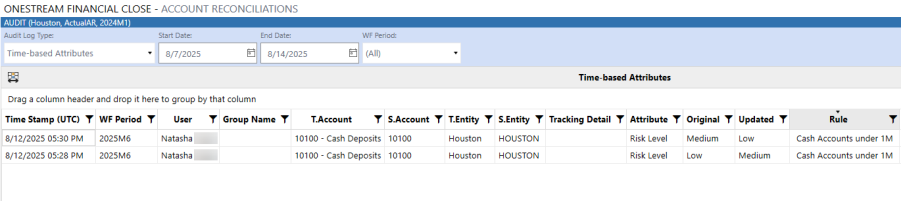
NOTE: When active rules are executed through a scheduled task, the User column will display System.
Task Scheduler
Administrators and Solution Administrators can set the RunAttributeMappingRules sequence as a task in Task Scheduler. The Task Scheduler captures active rules and the scheduled start period.
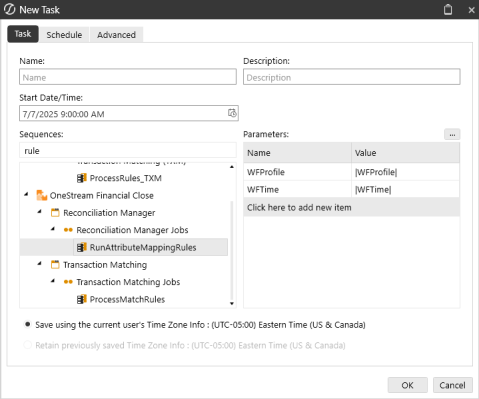
The following parameters are required for RunAttributeMappingRules:
-
WFProfile
-
WFTime
When the scheduled run task is executed, the task displays under Task Activity. Task Activity will also display the number of updated reconciliations (if applicable). See Task Scheduler Details.


