The service uses Serilog for application-level logging and exposes options for controlling naming convention, growth limits, and retention details. For example you can change the verbosity of log messages by changing the minimum-level setting from Verbose to Informational. If a catastrophic error happens, you can check the Windows event logs to review the errors. You can edit the Log Settings from the OneStream Local Gateway Configuration Utility.
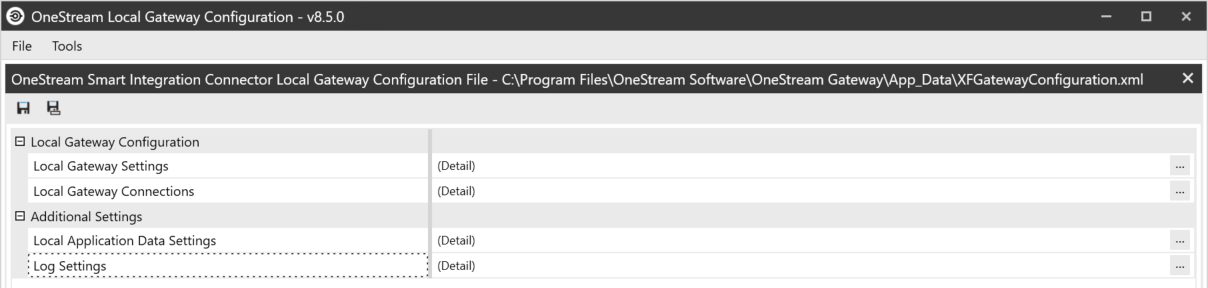
Click  to access Log Settings.
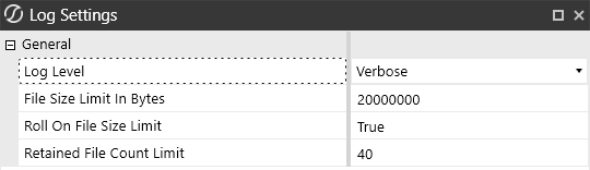
- Log Level descriptions:
- Verbose: The noisiest level, rarely (if ever) enabled for a production application.
- Debug: Used for internal system events that are not necessarily observable from the outside, but useful when determining how something happened.
- Information: Used to describe things happening in the system that correspond to its responsibilities and functions. Generally, these are the observable actions the system can perform. This is recommended for production environments and is the default setting upon installation.
- Warning: Service is degraded, endangered, or may be behaving outside of its expected parameters.
- Error: Logging of situations where functionality is unavailable or a recoverable error condition occurred.
- Fatal: Only the most critical level items would be logged, requiring immediate attention.
-
File Size Limit in Bytes: The maximum size for the log file, in bytes, before creating a new file for the day. The default is 20 MB.
-
Roll On File Size Limit: When a log file reaches the specified number of bytes, a new log file is generated.
-
Retained File Count Limit: Number of log files to retain. If logs do not exceed the limit in bytes (one file/day), this would allow for the configured value (with 40 days being the default) of log retention. If the Smart Integration Service is used heavily and log files are set to higher levels of verbosity, this could result in fewer days of log retention. Ensure that the growth rate and retention periods align with your organizational requirements.
The default location for log files is:
%programdata%\OneStream Software\OneStreamGatewayService\Logs.
NOTE: The log file's output has been updated to reflect the enhanced performance and reliability of multithreaded or parallel processing for larger payloads since the Platform Version v8.4 update.

