Data Retention
|
The Data Retention page displays the overview, configuration, and preview for Archiving and Purging. |
The Data Retention page enables the Transaction Matching Administrator to configure settings for Archiving and Purging matched transactions and to preview the number of matches and transactions to be Archived and Purged.
Archive
Archiving maintains matched transactions in the system and compresses the matched transactions in the database to minimize storage utilization. Matches are moved from the existing live tables such as, Transactions and TransactionsAttribute Tables, into a new archived table.
Archived Matched Transactions will display where they have been used in Account Reconciliations as reconciliation detail items. Transaction details can still be drilled into.
NOTE: Archived matched transactions are accessible in Account Reconciliations where they are used as detail item support.
IMPORTANT: Archiving data cannot be undone once it has been processed.
Purge
Purging permanently deletes the matched transactions from OneStream.
Purged Matched Transactions will display where they have been used in Account Reconciliations as reconciliation detail items. However, you CANNOT drill into the transaction details anymore.
IMPORTANT: Purging data cannot be undone once it has been processed.
Archive Setup
-
Overview
-
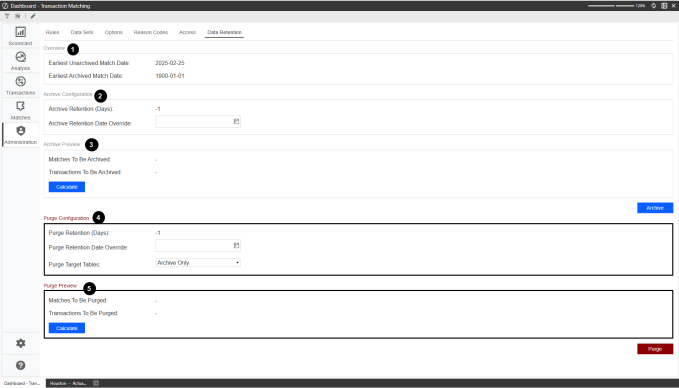
Earliest Unarchived Match Date: This date displays the oldest matched transactions that are currently in Transaction Matching and not yet archived.
-
Earliest Archived Match Date: This date references the archived matched transactions and displays the oldest.
-
-
Archive Configuration
-
Archive Retention (Days): This indicates that any matched transaction dated earlier than the Archive Retention (Days), (calculated from today’s date) will be archived. For example, if Days is set to 180 and today is September 1, 2025 then, transactions with matched dates earlier than 3/5/2025 (180 days earlier) will be archived.
-
The Archive Retention (Days) displays from the settings in the Match Set page. The value is read-only but can be modified in Match Sets.
-
The Archive Retention (Days) enables you to enter a numeric value greater than -1. The default value is -1, meaning nothing is being purged.
-
-
Archive Retention Date Override: When set, it overrides the Archive Retention (Days) and archives anything earlier than the day entered. For example, if the date 1/1/2025 is selected from the date picker than the Archived Retention (Days) is ignored and any matches with a matched date prior to 1/1/2025 are archived.
-
You can set the Archive Retention Date Override by selecting a date from the calendar picker.
-
By default the Archive Retention Date Override is blank and will look to the Archive Retention (Days) set.
-
-
-
Archive Preview
-
Matches To Be Archived: Displays the number of matches to be archived based on the Archive Configuration.
-
Transactions To Be Archived: Displays the number of transactions across all matches to be archived based on the Archive Configuration.
-
Calculate: The Admin clicks the calculate button to preview the number of Matches and Transactions to be archived.
-
Archive: Processes the matched transactions based on the configuration settings to the archived table. A dialog box displays to confirm the archive.
Purge Setup
CAUTION: Purging matched transactions deletes all the associated transactions and support permanently. Check your configuration settings before proceeding as this action cannot be undone.
-
-
Purge Configuration
-
Purge Retention (Days): This indicates that any matched transaction dated earlier than the Purge Retention (Days), (calculated from today’s date) will be purged. For example, if Days is set to 180 and today is September 1, 2025 then, transactions with matched dates earlier than 3/5/2025 (180 days earlier) will be purged.
-
The Purge Retention (Days) displays from the settings in the Match Set page. The value is read-only but can be modified in Match Sets.
-
The Purge Retention (Days) enables you to enter a numeric value greater than -1. The default value is -1, meaning nothing is being purged.
-
- Purge Retention Date Override: When set, it overrides the Purge Retention (Days) and archives anything earlier than the day entered. For example, if the date 1/1/2025 is selected from the date picker than the Purge Retention (Days) is ignored and any matches with a matched date prior to 1/1/2025 are purged.
You can set the Purge Retention Date Override by selecting a date from the calendar picker.
By default the Purge Retention Date Override is blank and looks to the Purge Retention (Days) set.
-
Purge Target Tables: Enables you to choose if the purged matches come from the Archived Only, Live Tables or both.
-
Purge Target Table default is set to Archive Only.
-
-
-
Purge Preview
- Matches To Be Purged: Displays the number of matches to be purged based on the Purge Configuration.
-
Transactions To Be Purged: Displays the number of transactions across all matches to be purged based on the Purged Configuration.
-
Calculate: The Admin clicks the calculate button to preview the number of Matches and Transactions to be purged.
-
Purge: Deletes all matched transactions per the Purge Configuration. A warning message displays before proceeding.
Task Scheduler
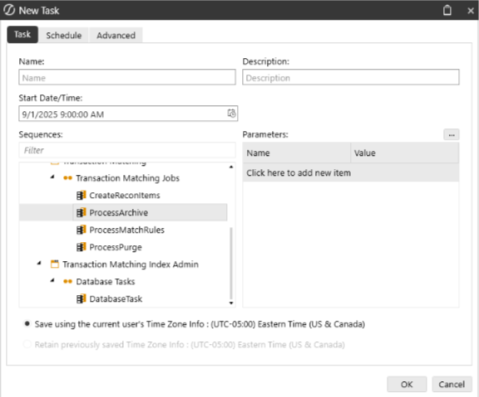
You can configure archiving and purging to run on a schedule using Task Scheduler. Set the ProcessArchive or ProcessPurge job. The scheduled job will look to the relevant settings at the time for archiving or purging, set up within the Match Sets and Data Retention pages. The PurgeProcess within Task Scheduler automatically looks to the archived tables. The Administrator can set the live tables or Both by adding the parameter PurgeTargetType.