Scorecard
|
|
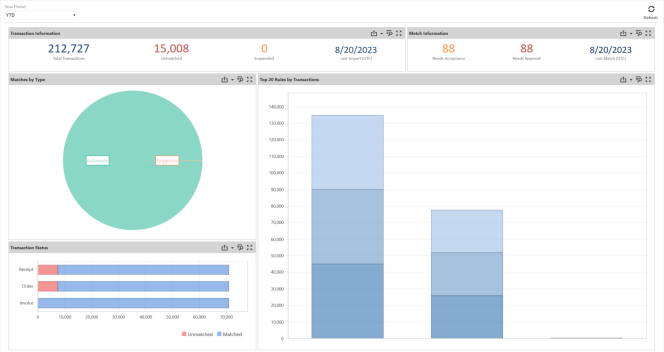
The Scorecard is a visual display of Key Performance Indicators of the active match set based on a selected Time Period. |

The Time Period dropdown includes the following options:
-
Periodic
-
YTD
-
Trailing 12 Months
NOTE: Periodic is the default time period.
Statistics are based on transactions for which a user has access that were loaded and/or matches created in the selected Date Range. Information is available in the following areas:
-
Transaction Information is a text-based summary of all transactions
-
Match Information is a text-based summary of match results
-
Matches by Type is a pie chart that displays the number of Automatic, Manual, and Suggested matches while also showing the proportional to the sum of all matches in the match set. Hover the mouse over the titles to view total and percentage values.
-
Transaction Status is a stacked bar chart displaying the number of Unmatched, Matched, Suspended, Pending Delete, and Deleted transactions, with the data sets on the vertical axis and their values along the horizontal axis. Hover the mouse over the chart to view totals by transaction status.
-
Top 20 Rules by Transaction is a stacked column chart that displays the rule type along the horizontal axis and their values on the vertical axis. Hover the mouse over a shaded section to view the rule name and results.
IMPORTANT: If Data Security is enabled, information displayed relates to the user's security access.
The data displayed on each individual chart can be reviewed further by utilizing the following functions:

|
Maximize a section of the Scorecard |

|
Minimize a section of the Scorecard |

|
Export data |

|
Inspect data |


