This section contains important details about the solution's planning, configuration, and installation. Before you install the solution, familiarize yourself with these details.
Dependencies
|
Component |
Description |
|---|---|
|
OneStream 8.4.0 or later |
Minimum OneStream Platform version required to install this version of Allocations Management. |
Solution Development Location
Before beginning installation, decide whether to build the solution directly in the Production OneStream application or a separate Development OneStream application. This section provides some key considerations for each option.
Production OneStream Application: The primary advantage of building the solution in a Production application is to not have to migrate the resulting work from a Development application. However, there are intrinsic risks when making design changes to an application used in a Production capacity and not advised.
IMPORTANT: It is recommended that you implement the solution in the Development environment with a fresh copy of the Production application before starting work.
Development OneStream Application: As a best practice, use the Development OneStream application to configure and test the solution initially.
Installation
-
Log into OneStream.
-
On the Application tab, click Tools > Load/Extract.
-
On the Load tab, locate the solution package using the Select File icon and click Open.
-
When the solutions file name appears, click Load.
-
Click Close to complete the installation.
Package Contents
OneStream Allocations Management is the user interface for the settings & setup of OneStream Allocations Management.
Business Rules
The following Business Rules are included:
-
FALL_Constants
-
FALL_Factors
-
FALL_FileImport
-
FALL_FinanceCalcHelper
-
FALL_GenealogyDrill
-
FALL_GlobalRoutines
-
FALL_HelperQueries
-
FALL_ImportExportHelper
-
FALL_Licensing
-
FALL_ParamHelper
-
FALL_PerformanceLogging
-
FALL_RuleSets
-
FALL_Security
-
FALL_Settings
-
FALL_Setup
-
FALL_SolutionHelper
-
FALL_Utilities
-
FALL_ValidationSupport
Data Structures
The following Data Tables will be created during installation of the solution:
-
XFW_FALL_Alloc_Master
-
XFW_FALL_AuditLog
-
XFW_FALL_ControlLists
-
XFW_FALL_Filter
-
XFW_FALL_Genealogy
-
XFW_FALL_Main
Initial Setup
The first time you run the solution, you are guided through the solution setup process.
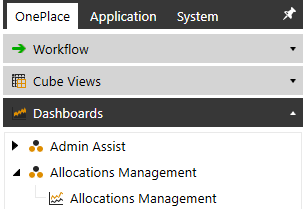
In OneStream, click OnePlace > Dashboards > Allocations Management > Allocations Management.
Solution Setup Steps
The first part of the setup involves creating necessary solution database tables.
-
Click Begin Setup
-
This step may be necessary when upgrading the solution in the future.
-
-
Click Setup Tables to create the necessary solution database tables.
-
Click Update Tables when performing an update with existing tables
-
-
Once completed, click Launch Solution.


