All the reports in the OneStream Admin Assist Security Report Set are detailed in this section.
Business Rule Security
The Business Rule Security report shows a list of business rules in the OneStream application with its associated security attributes.

These are the columns on this report:
|
Attribute |
Description |
|---|---|
|
Business Rule Name |
Business rule name |
|
Is Encrypted |
Indicates if the business rule is encrypted or not |
|
Access Group |
Indicates access group of users that can see, but not modify, the business rule |
|
Access Group Descendent |
For access groups that contain other groups or users, the child group will display here. (Only shown for groups and users detail level) |
|
Access Group Descendent Type |
Indicates whether the child is a group or user (only shown for groups and users detail level) |
|
Access Group Inheritance Type |
Indicates whether the child is directly assigned or inherits access to the parent |
|
Maintenance Group |
Shows group of users that can see the business rule and make modifications to it |
Certification Questions Security
The Certification Questions Security report has tabs for group security and profile security for certification questions.
 These are the columns on the Certification Questions Group Security report:
|
Attribute |
Description |
|---|---|
|
Certification Question Group Name |
Certification question group name |
|
Description |
Certification question group description |
|
Scenario Type |
Indicates the Scenario Type or Types that the certification question group applies to |
|
Access Group |
Indicates access group of users that can see, but not modify, the certification question group |
|
Access Group Descendent |
For access groups that contain other groups or users, the child group will display here. (Only shown for groups and users detail level) |
|
Access Group Descendent Type |
Indicates whether the child is a group or user (only shown for groups and users detail level) |
|
Access Group Inheritance Type |
Indicates whether the child is directly assigned or inherits access to the parent |
|
Maintenance Group |
Shows group of users that can see the certification question group and make modifications to it |
The second tab is the Certification Questions Profile Security report and shows a list of certification question profiles.

These are the columns on the Certification Questions Profile Security report:
|
Attribute |
Description |
|---|---|
|
Certification Question Profile Name |
Certification question profile name |
|
Description |
Certification question profile description |
|
Cube |
Indicates the cube or cubes that the certification question profile applies to |
|
Scenario Type |
Indicates the Scenario Type or Types that the certification question profile applies to |
|
Access Group |
Indicates access group of users that can see, but not modify, the certification question profile |
|
Access Group Descendent |
For access groups that contain other groups or users, the child group will display here. (Only shown for groups and users detail level) |
|
Access Group Descendent Type |
Indicates whether the child is a group or user (only shown for groups and users detail level) |
|
Access Group Inheritance Type |
Indicates whether the child is directly assigned or inherits access to the parent |
|
Maintenance Group |
Shows group of users that can see the certification question profile and make modifications to it |
Confirmation Rules Security
The Confirmation Rules Security report has tabs for group security and profile security for confirmation rules.

These are the columns on the Confirmation Rules Group Security report:
|
Attribute |
Description |
|---|---|
|
Confirmation Rules Group Name |
Confirmation rules group name |
|
Description |
Confirmation rules group description |
|
Scenario Type |
Indicates the Scenario Type or Types that the confirmation rules group applies to |
|
Access Group |
Indicates access group of users that can see, but not modify, the confirmation rules group |
|
Access Group Descendent |
For access groups that contain other groups or users, the child group will display here. (Only shown for groups and users detail level) |
|
Access Group Descendent Type |
Indicates whether the child is a group or user (only shown for groups and users detail level) |
|
Access Group Inheritance Type |
Indicates whether the child is directly assigned or inherits access to the parent |
|
Maintenance Group |
Shows group of users that can see the confirmation rules group and make modifications to it |
The second tab is the Confirmation Rules Profile Security report and shows a list of confirmation rules profiles.

These are the columns on the Confirmation Rules Profile Security report:
|
Attribute |
Description |
|---|---|
|
Confirmation Rules Profile Name |
Confirmation rules profile name |
|
Description |
Confirmation rules profile description |
|
Cube |
Indicates the cube or cubes that the confirmation rules profile applies to |
|
Scenario Type |
Indicates the Scenario Type or Types that the confirmation rules profile applies to |
|
Access Group |
Indicates access group of users that can see, but not modify, the confirmation rules profile |
|
Access Group Descendent |
For access groups that contain other groups or users, the child group will display here. (Only shown for groups and users detail level) |
|
Access Group Descendent Type |
Indicates whether the child is a group or user (only shown for groups and users detail level) |
|
Access Group Inheritance Type |
Indicates whether the child is directly assigned or inherits access to the parent |
|
Maintenance Group |
Shows group of users that can see the confirmation rules profile and make modifications to it |
Cube Security
The Cube Security report shows a list of cubes in the OneStream application and access and maintenance group names associated with the cubes.

These are the columns on this report:
|
Attribute |
Description |
|---|---|
|
Cube Name |
Cube name |
|
Description |
Cube description |
|
Access Group |
Indicates access group of users that can see, but not modify, the cube |
|
Access Group Descendent Name |
For access groups that contain other groups or users, the child group will display here. (Only shown for groups and users detail level) |
|
Access Group Descendent Type |
Indicates whether the child is a group or user (only shown for groups and users detail level) |
|
Access Group Inheritance Type |
Indicates whether the child is directly assigned or inherits access to the parent |
|
Maintenance Group Name |
Shows group of users that can see the cube and make modifications to it |
Cube View Security
The Cube View Security report has tabs for group security and profile security for Cube Views and enables the user to see the security group setup for Cube View Groups and Cube View Profiles.

These are the columns on the Cube View Group Security report:
|
Attribute |
Description |
|---|---|
|
Cube View Group Name |
Cube View Group name |
|
Description |
Cube View Group description |
|
Access Group Name |
Indicates access group of users that can see, but not modify, the Cube View Group |
|
Access Group Descendent Name |
For access groups that contain other groups or users, the child group will display here. (Only shown for groups and users detail level) |
|
Access Group Descendent Type |
Indicates whether the child is a group or user (only shown for groups and users detail level) |
|
Access Group Inheritance Type |
Indicates whether the child is directly assigned or inherits access to the parent |
|
Maintenance Group Name |
Shows group of users that can see the Cube View and make modifications to it |
The Cube View Profile Security report tab shows a list of Cube View Profiles.

These are the columns on the Cube View Profile Security report:
|
Attribute |
Description |
|---|---|
|
Cube View Profile Name |
Cube View Profile name |
|
Description |
Cube View Profile description |
|
Visibility |
Indicates the visibility settings for the Cube View Profile. This setting controls whether the Cube View Profile is visible in OnePlace, Workflows, Excel, etc. |
|
Access Group Name |
Indicates access group of users that can see, but not modify, the Cube View Group Profile |
|
Access Group Descendent Name |
For access groups that contain other groups or users, the child group will display here. (Only shown for groups and users detail level) |
|
Access Group Descendent Type |
Indicates whether the child is a group or user (only shown for groups and users detail level) |
|
Access Group Inheritance Type |
Indicates whether the child is directly assigned or inherits access to the parent |
|
Maintenance Group Name |
Shows group of users that can see the Cube View Group Profile and make modifications to it |
Dashboard Security
The Dashboard Security report has tabs for dashboard maintenance unit security, dashboard group security, and dashboard profile security.

These are the columns on the Dashboard Maintenance Unit Security report:
|
Attribute |
Description |
|---|---|
|
Dashboard Maintenance Unit Name |
Dashboard maintenance unit name |
|
Description |
Dashboard maintenance unit description |
|
Access Group Name |
Indicates access group of users that can see, but not modify, the Dashboard Maintenance Unit |
|
Access Group Descendent Name |
For access groups that contain other groups or users, the child group will display here. (Only shown for groups and users detail level) |
|
Access Group Descendent Type |
Indicates whether the child is a group or user (only shown for groups and users detail level) |
|
Access Group Inheritance Type |
Indicates whether the child is directly assigned or inherits access to the parent |
|
Maintenance Group Name |
Shows group of users that can see the dashboard maintenance unit and make modifications to it |
The Dashboard Group Security report tab shows a list of dashboard groups.

These are the columns on the Dashboard Group Security report:
|
Attribute |
Description |
|---|---|
|
Dashboard Group Name |
Dashboard group name |
|
Description |
Dashboard group description |
|
Access Group Name |
Indicates access group of users that can see, but not modify, the dashboard group |
|
Access Group Descendent Name |
For access groups that contain other groups or users, the child group will display here. (Only shown for groups and users detail level) |
|
Access Group Descendent Type |
Indicates whether the child is a group or user (only shown for groups and users detail level) |
|
Access Group Inheritance Type |
Indicates whether the child is directly assigned or inherits access to the parent |
|
Maintenance Group Name |
Shows group of users that can see the dashboard and make modifications to it |
The Dashboard Profile Security report tab shows a list of Dashboard Profiles.

These are the columns on the Dashboard Profile Security report:
|
Attribute |
Description |
|---|---|
|
Dashboard Profile Name |
Dashboard profile name |
|
Description |
Dashboard profile description |
|
Visibility |
Indicates the visibility settings for the dashboard profile. This setting controls whether the dashboard profile is visible in OnePlace, Workflows, Excel, etc. |
|
Access Group Name |
Indicates access group of users that can see, but not modify, the dashboard profile |
|
Access Group Descendent Name |
For access groups that contain other groups or users, the child group will display here. (Only shown for groups and users detail level) |
|
Access Group Descendent Type |
Indicates whether the child is a group or user (only shown for groups and users detail level) |
|
Access Group Inheritance Type |
Indicates whether the child is directly assigned or inherits access to the parent |
|
Maintenance Group Name |
Shows group of users that can see the dashboard profile and make modifications to it |
Data Management Security
The Data Management Security report has tabs for group security and profile security for data management jobs and enables the user to see the security group setup for data management groups and data management profiles.

These are the columns on the Data Management Group Security report:
|
Attribute |
Description |
|---|---|
|
Data Management Group Name |
Data management group name |
|
Description |
Data management group description |
|
Access Group Name |
Indicates access group of users that can see, but not modify, the data management group |
|
Access Group Descendent Name |
For access groups that contain other groups or users, the child group will display here. (Only shown for groups and users detail level) |
|
Access Group Descendent Type |
Indicates whether the child is a group or user (only shown for groups and users detail level) |
|
Access Group Inheritance Type |
Indicates whether the child is directly assigned or inherits access to the parent |
|
Maintenance Group Name |
Shows group of users that can see the data management job and make modifications to it |
The Data Management Profile Security report tab shows a list of data management profiles.
These are the columns on the Data Management Profile Security report:
|
Attribute |
Description |
|---|---|
|
Data Management Profile Name |
Data management profile name |
|
Description |
Data management profile description |
|
Access Group Name |
Indicates access group of users that can see, but not modify, the data management profile |
|
Access Group Descendent Name |
For access groups that contain other groups or users, the child group will display here. (Only shown for groups and users detail level) |
|
Access Group Descendent Type |
Indicates whether the child is a group or user (only shown for groups and users detail level) |
|
Access Group Inheritance Type |
Indicates whether the child is directly assigned or inherits access to the parent |
|
Maintenance Group Name |
Shows group of users that can see the data management profile and make modifications to it |
Data Source Security
The Data Source security report shows a list of all data sources in the OneStream application. Because data sources can vary by Scenario Type, the Scenario Type attribute is also included in the report. The following example shows the report and a table of the attributes.

|
Attribute |
Description |
|---|---|
|
Scenario Type |
This allows the profile to be assigned to a specific Scenario Type or All Scenario Types. If the data source is assigned to a specific Scenario Type, it will only be available when assigned to the Workflow Profile. |
|
Data Source Name |
Name of the data source |
|
Description |
Description of the data source (if available) |
|
Layout Type |
The layout type of the data source. It will be Fixed, Delimited, Connector, or DataMgmtExportSequence. |
|
Cube |
The cube associated with this data source, which will dictate the available dimensions that can be used |
|
Access Group Name |
Members of the assigned group have the authority to access the data source. |
|
Access Group Descendent Name |
For access groups that contain other groups or users, the child group will display here. (Only shown for groups and users detail level) |
|
Access Group Descendent Type |
Indicates whether the child is a group or user (only shown for groups and users detail level) |
|
Access Group Inheritance Type |
Indicates whether the child is directly assigned or inherits access to the parent |
|
Maintenance Group Name |
Members of the assigned group have the authority to maintain the data source. |
Dimension Metadata Security
The Dimension Metadata Security report enables a user to run a report that shows access to dimension members down to the user level. This report is useful to an administrator looking to see what entities a user has access to, for example, and can be used to trace security setup issues. It is also useful as an audit report to show who has access to what metadata in the application.
Select a dimension in the drop-down menu and optionally the top member in the dimension that you would like to run the report for. Then, click the Run button to generate a report as shown in the following example. For large dimensions, this may take several minutes.

The following example shows the output:
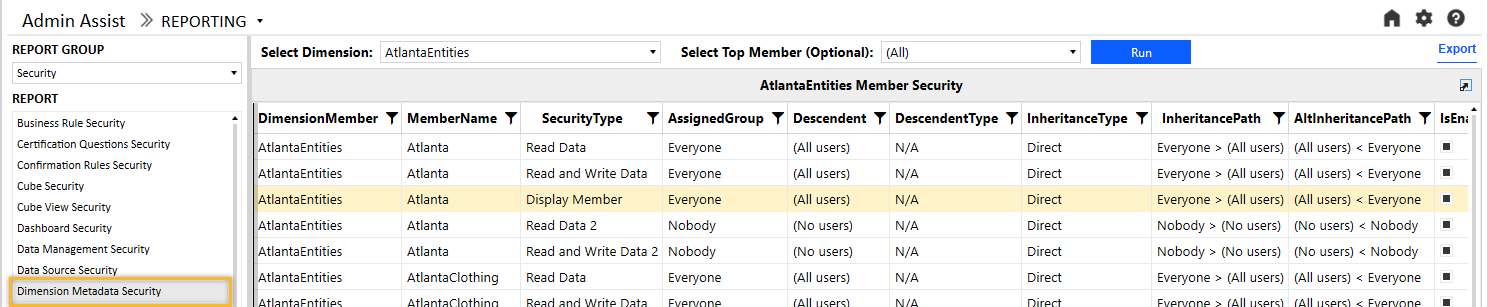
These are the columns on this report:
|
Attribute |
Description |
|---|---|
|
Dimension Name |
The name of the dimension selected when running the report |
|
Member Name |
Member name |
|
Security Type |
This includes all applicable security groups for the selected dimension. |
|
Assigned Group |
The security group applied for the specified group type. The group that is explicitly assigned in the metadata will show as Direct under assignment type. |
|
Descendent |
For groups that contain other groups or users, the child group will display here. (Only shown for groups and users detail level) |
|
Descendent Type |
Indicates whether the child is a group or user (only shown for groups and users detail level) |
|
Inheritance Type |
Indicates whether the child is directly assigned or inherits access to the parent |
|
Inheritance Path |
This column shows how the group or user received access through an inheritance path. The first group listed is the group that the descendent has access to. Reading the inheritance path to the right will show how groups are nested to ultimately arrive to the ancestor. In the previous example, the Everyone group contains (All users). |
|
Alternate Inheritance Path |
This column shows how the group or user received the access through an inheritance path but in reversed order to show from child to parent. The first item will be the descendent. Reading the inheritance path to the right will show how groups are nested to ultimately arrive at the ancestor. In the previous example, (All users) are a member of the Everyone group. |
|
Child Enabled |
Whether or not the child is enabled for provisioning |
The report has the potential to generate thousands of records because it drills down to user-level access for all members of a dimension. Therefore, large dimensions with complex security group structures will be slower to generate. To help with performance, the Everyone and Nobody groups will not drill down to user-level access. If details on the Everyone group are required, navigate to the User Analysis report. The list of users can be exported to Excel as a supplement to the Dimension Metadata Security report. For dimensions with many members, it is recommended to pre-filter the report by selecting a parent member.
Dimension Security
The Dimension Security report shows the access group and maintenance group security associated with all dimensions in the OneStream application. The following example shows this report.

These are the columns on this report:
|
Attribute |
Description |
|---|---|
|
Dimension Type |
This is the type of the dimension, such as Entity, Account, UD1, etc. Only the customizable dimensions will be shown on this report. The Parent, Cons, Origin, IC, View, and Time dimensions are not securable and therefore will not display here. |
|
Dimension Name |
Dimension name |
|
Description |
Dimension description (if available) |
|
Access Group Name |
Security group that has access to the dimension but cannot modify it |
|
Access Group Descendent Name |
For access groups that contain other groups or users, the child group will display here. (Only shown for groups and users detail level) |
|
Access Group Descendent Type |
Indicates whether the child is a group or user (only shown for groups and users detail level) |
|
Access Group Inheritance Type |
Indicates whether the child is directly assigned or inherits access to the parent |
|
Maintenance Group Name |
Security group that has access and can make changes to the dimension |
Form Template Security
The Form Template Security report has tabs for group security and profile security for form templates and enables the user to see the security group setup for form template groups and form template profiles.

These are the columns on the Form Template Group Security report:
|
Attribute |
Description |
|---|---|
|
Form Template Group Name |
Form template group name |
|
Description |
Form template group description |
|
Access Group Name |
Indicates access group of users that can see, but not modify, the form template group |
|
Access Group Descendent Name |
For access groups that contain other groups or users, the child group will display here. (Only shown for groups and users detail level) |
|
Access Group Descendent Type |
Indicates whether the child is a group or user (only shown for groups and users detail level) |
|
Access Group Inheritance Type |
Indicates whether the child is directly assigned or inherits access to the parent |
|
Maintenance Group Name |
Shows group of users that can see the form template group and make modifications to it |
The Form Template Profile Security report tab shows a list of form template profiles.
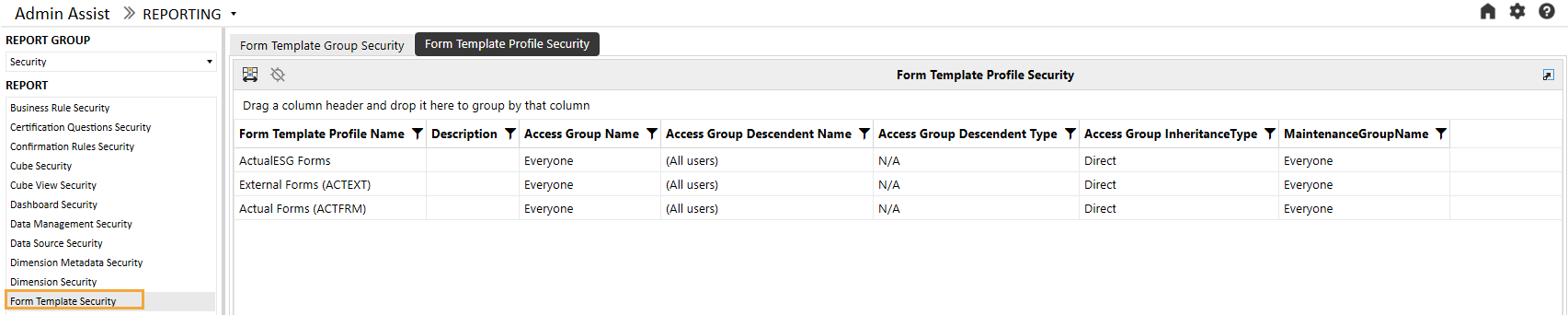
These are the columns on the Form Template Profile Security report:
|
Attribute |
Description |
|---|---|
|
Form Template Profile Name |
Form template profile name |
|
Description |
Form template profile description |
|
Access Group Name |
Indicates access group of users that can see, but not modify, the form template profile |
|
Access Group Descendent Name |
For access groups that contain other groups or users, the child group will display here. (Only shown for groups and users detail level) |
|
Access Group Descendent Type |
Indicates whether the child is a group or user (only shown for groups and users detail level) |
|
Access Group Inheritance Type |
Indicates whether the child is directly assigned or inherits access to the parent |
|
Maintenance Group Name |
Shows group of users that can see the form template profile and make modifications to it |
Journal Template Security
The Journal Template Security report has tabs for group security and profile security for journal templates and enables the user to see the security group setup for journal template groups and journal template profiles.
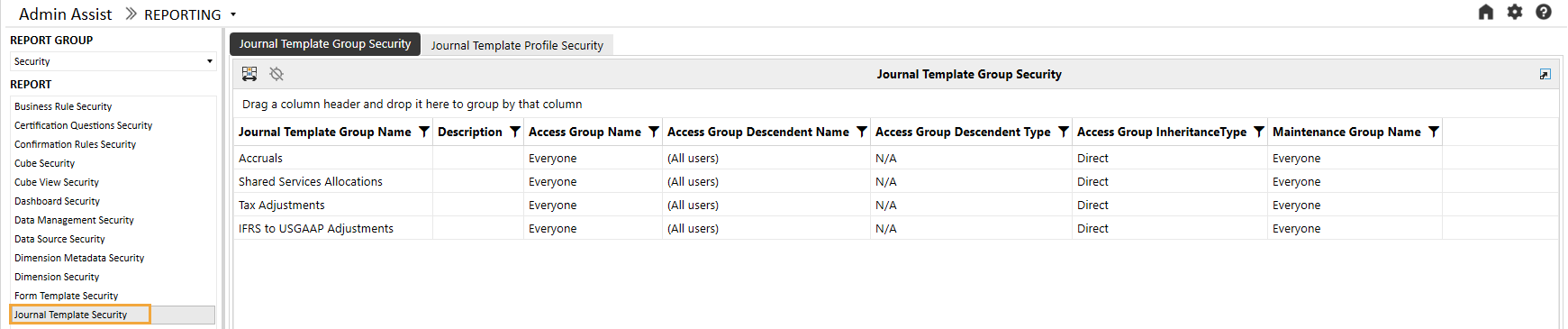
These are the columns on the Journal Template Group Security report:
|
Attribute |
Description |
|---|---|
|
Journal Template Group Name |
Journal template group name |
|
Description |
Journal template group description |
|
Access Group Name |
Indicates access group of users that can see, but not modify, the journal template group |
|
Access Group Descendent Name |
For access groups that contain other groups or users, the child group will display here. (Only shown for groups and users detail level) |
|
Access Group Descendent Type |
Indicates whether the child is a group or user (only shown for groups and users detail level) |
|
Access Group Inheritance Type |
Indicates whether the child is directly assigned or inherits access to the parent |
|
Maintenance Group Name |
Shows group of users that can see the journal template group and make modifications to it |
The Journal Template Profile Security report tab shows a list of journal template profiles.
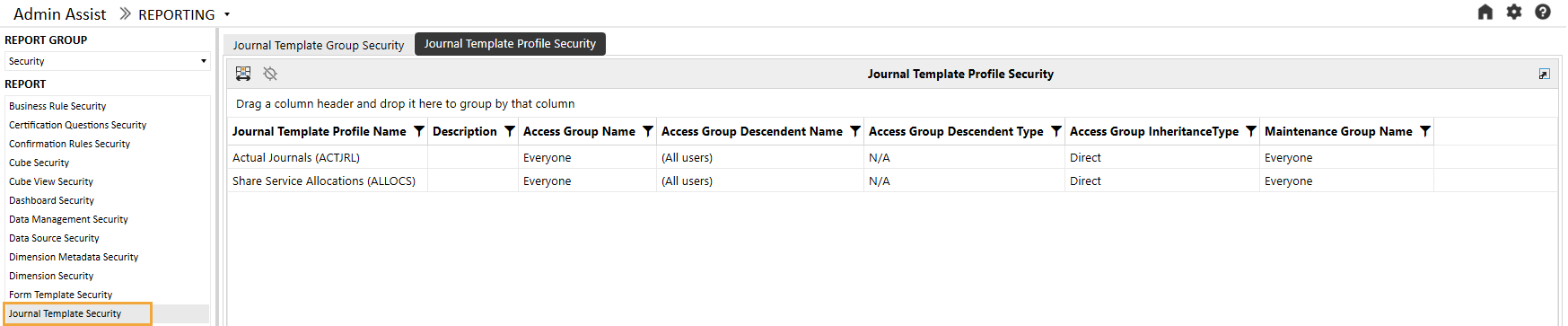
These are the columns on the Journal Template Profile Security report:
|
Attribute |
Description |
|---|---|
|
Journal Template Profile Name |
Journal template profile name |
|
Description |
Journal template profile description |
|
Access Group Name |
Indicates access group of users that can see, but not modify, the journal template profile |
|
Access Group Descendent Name |
For access groups that contain other groups or users, the child group will display here. (Only shown for groups and users detail level) |
|
Access Group Descendent Type |
Indicates whether the child is a group or user (only shown for groups and users detail level) |
|
Access Group Inheritance Type |
Indicates whether the child is directly assigned or inherits access to the parent |
|
Maintenance Group Name |
Shows group of users that can see the journal template profile and make modifications to it |
Other Security Reports
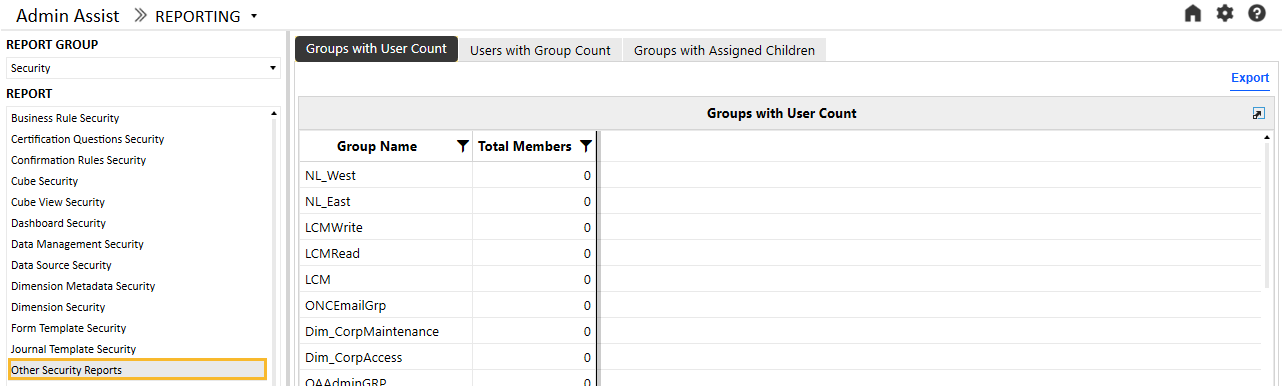
The Other Security Reports group contains additional reports for analytics and review purposes. The Groups with User Count tab lists all security groups in the system with the number of members in the group (either users or other groups). This can be helpful for removing unnecessary groups that do not contain members. The following example shows the output.
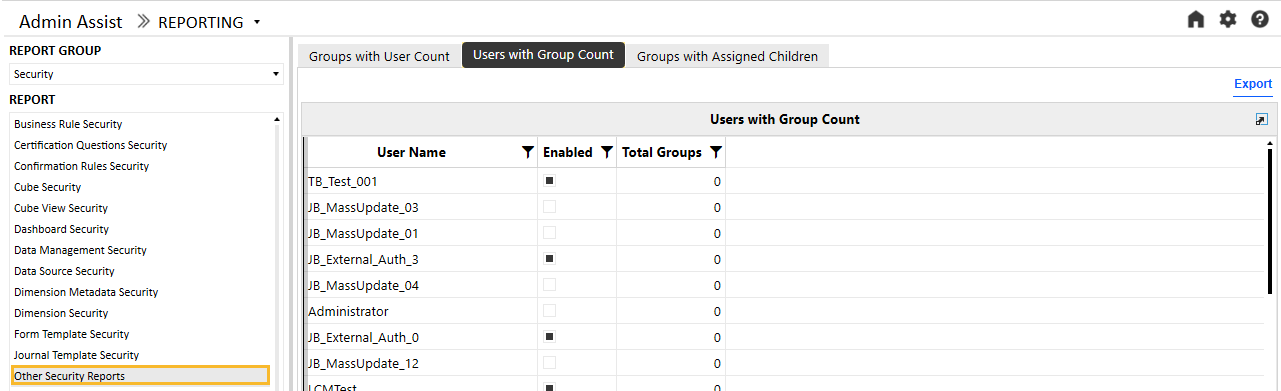
The Users with Group Count tab shows a list of users in the system, a flag that indicates if the user is enabled, and the number of total groups the user belongs to. Like the Groups with User Count report, this report can identify users that need to be disabled when they do not belong to any groups.
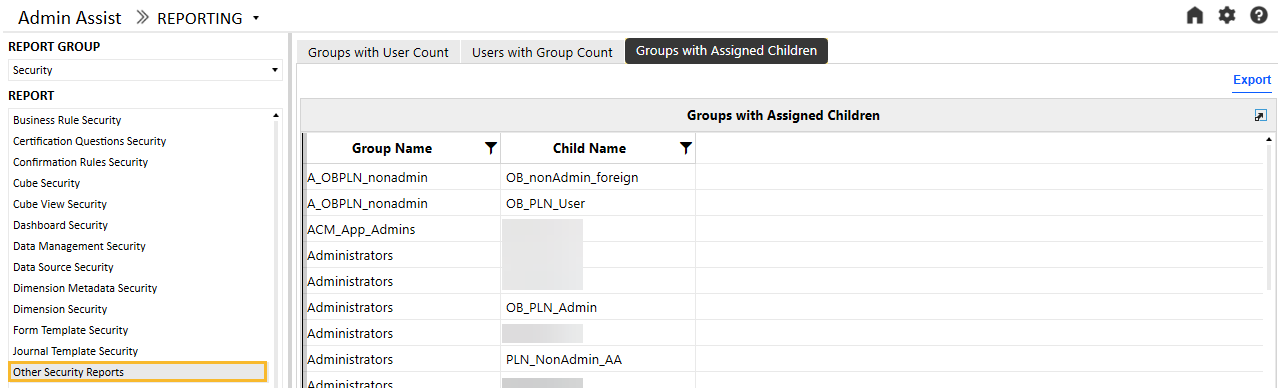
The Groups with Assigned Children tab shows the groups and related users within each group.
Security Group Analysis
The Security Group Analysis report shows a list of current groups in the system. More details on a group can be accessed by clicking on the name in the list in the left panel. This will update the reports in the right panel, as shown in the following example:
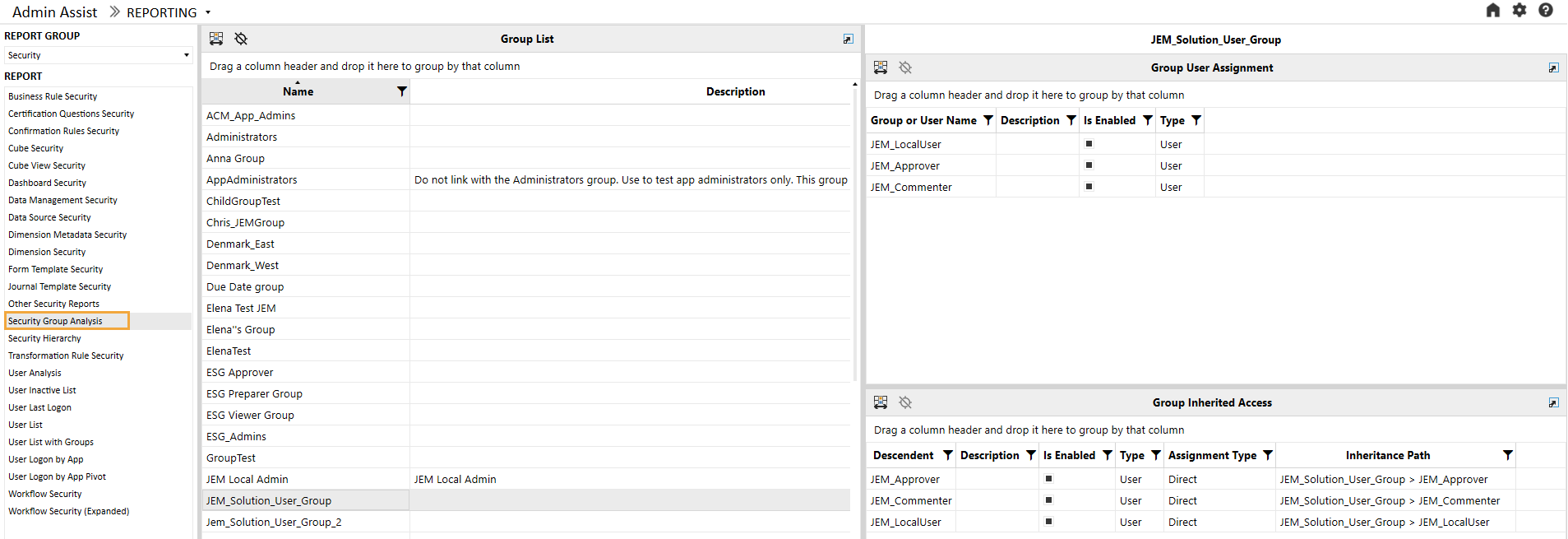
The top panel shows which users or groups have been provisioned in the selected group. In the previous example, JEM_LocalUser, JEM_Approver, and JEM_Commentator have been directly assigned to JEM_Solution_User_Group. This report has columns Group or User Name, Description, Is Enabled (True or False), and Type (User or Group).
The bottom panel shows which groups or users inherit access to the group based on their direct provisioning. In addition to the Descendent, Description, Is Enabled, and Type columns, this report has additional columns:
|
Attribute |
Description |
|---|---|
|
Assignment Type |
Direct indicates that the group or user has been directly provisioned in the group. Inherited indicates that the group or user receives access to this group indirectly through nested security groups. |
|
Inheritance Path |
This column shows how the group or user received access through an inheritance path. The first group listed is the group that the descendent has access to. Reading the inheritance path to the right will show how groups are nested to ultimately arrive at the ancestor. In the previous example, the first record shows that JEM_Solution_User_Group contains JEM_Approver. |
Security Hierarchy
The Security Hierarchy report enables users to see the full security assignment structure for the application. The report has List View and Hierarchy View. To run, select the layout of the report to view, then click the Run button.
List View
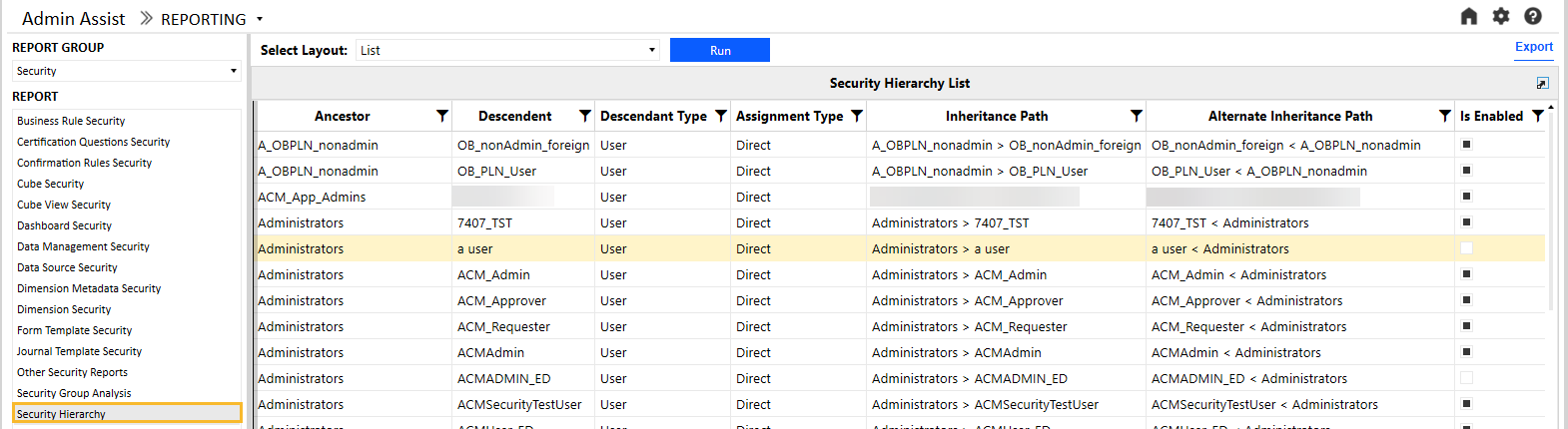
The List View shows a flat list of parent-child relationships in the security structure. This view is useful for exporting the data to Excel and using a pivot table to analyze the data.
NOTE: Only groups with provisioned users or groups will display in this report. The following example is a sample of the report.
|
Attribute |
Description |
|---|---|
|
Ancestor |
Security group that has groups or users provisioned |
|
Descendent |
Security group or user that has access to the parent group |
|
Descendent Type |
Indicates whether the child is a group or user |
|
Assignment Type |
Indicates whether the child is directly assigned or inherits access to the parent |
|
Inheritance Path |
This column shows how the group or user received access through an inheritance path. The first group listed is the group that the descendent has access to. Reading the inheritance path to the right will show how groups are nested to ultimately arrive to the ancestor. In the previous example, the first record shows that Administrators contains ACM_Admin. Focusing on the ACM_Admin user, there are several parents that contain the Administrators group. Therefore, the security settings for those parents will be inherited by the Administrators group and ultimately by the ACM_Admin user. |
|
Alternate Inheritance Path |
This column shows how the group or user received the access through an inheritance path but in reversed order to show from child to parent. The first item will be the descendent. Reading the inheritance path to the right will show how groups are nested to ultimately arrive to the ancestor. In the previous example, the first record shows that ACM_Admin is a member of Administrators. |
Hierarchy View
The Hierarchy view shows how security groups are nested and whether inherited security is in effect. The following example is a sample of this report. It shows which groups or users belong to each group and will inherit that security profile.
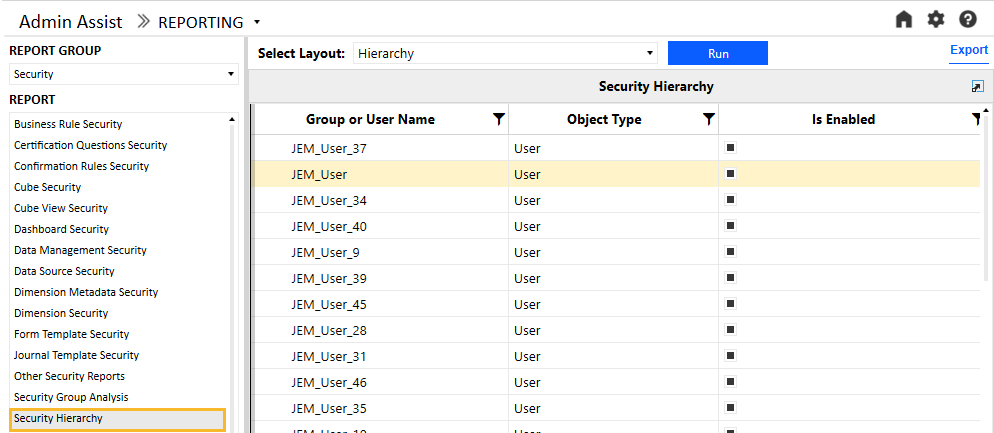
This report has these columns:
|
Attribute |
Description |
|---|---|
|
Group or User Name |
Name of the group or user |
|
Object Type |
Indicates if the object is a group or a user |
|
Is Enabled |
Whether or not the object is enabled for provisioning |
Transformation Rule Security
The Transformation Rule Security report shows tabs for transformation rule group security and transformation rule profile security.
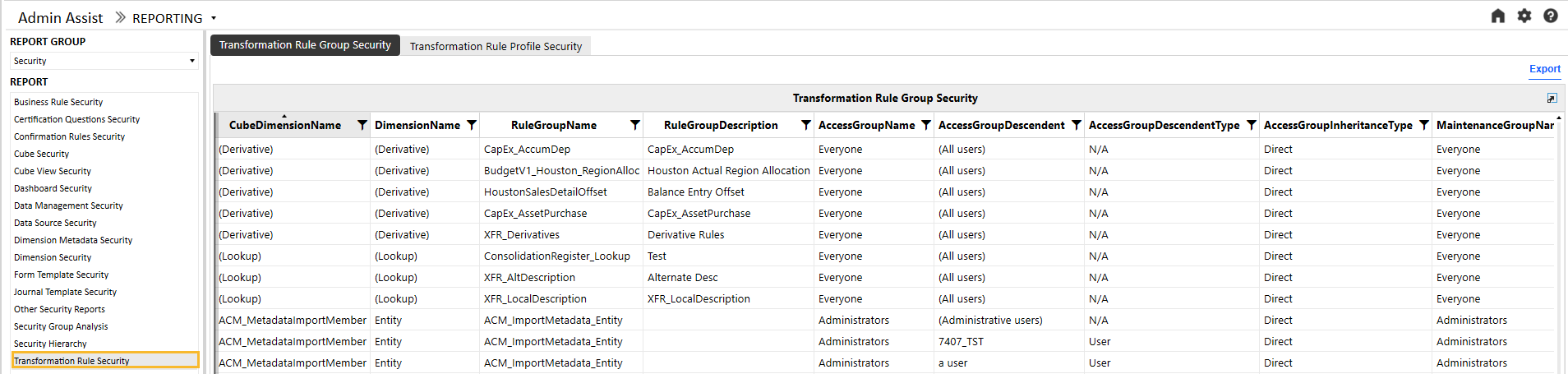
These are the columns on the Transformation Rule Group Security report:
|
Attribute |
Description |
|---|---|
|
Cube Dimension Name |
Dimension to which the rule group is assigned |
|
Dimension Name |
Dimension type (for example, Entity, Account) |
|
Rule Group name |
Name of the rule group |
|
Rule Group Description |
Description of the rule group (if applicable) |
|
Access Group Name |
Members of this group will have access to the transformation rule group |
|
Access Group Descendent Name |
For access groups that contain other groups or users, the child group will display here. (Only shown for groups and users detail level) |
|
Access Group Descendent Type |
Indicates whether the child is a group or user (only shown for groups and users detail level) |
|
Access Group Inheritance Type |
Indicates whether the child is directly assigned or inherits access to the parent |
|
Maintenance Group Name |
Members of this group have the authority to maintain the transformation rule group. |
The Transformation Rule Profile Security report tab shows a list of transformation rule profiles.
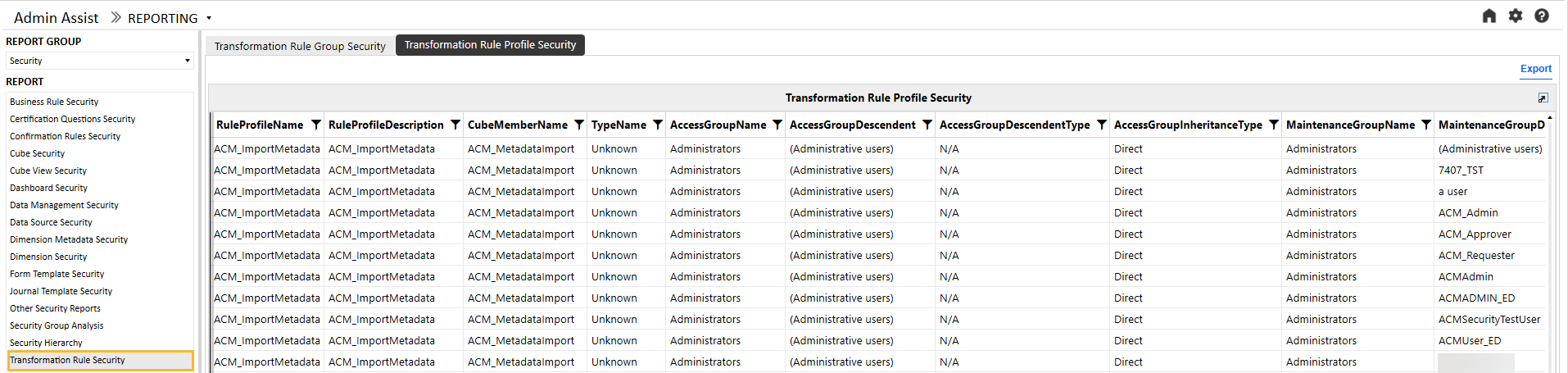
These are the columns on the Transformation Rule Profile Security report:
|
Attribute |
Description |
|---|---|
|
Rule Profile Name |
Name of the rule profile |
|
Rule Profile Description |
Description of the rule profile (if applicable) |
|
Cube Name |
Cube to which the rule profile is assigned |
|
Scenario Type |
Scenario Type to which the rule profile is assigned |
|
Access Group Name |
Members of this group will have access to the transformation rule profile |
|
Access Group Descendent Name |
For access groups that contain other groups or users, the child group will display here. (Only shown for groups and users detail level) |
|
Access Group Descendent Type |
Indicates whether the child is a group or user (only shown for groups and users detail level) |
|
Access Group Inheritance Type |
Indicates whether the child is directly assigned or inherits access to the parent |
|
Maintenance Group Name |
Members of this group have the authority to maintain the transformation rule profile. |
User Analysis
The User Analysis report shows a list of current users in the system and includes the following attributes:
|
Attribute |
Description |
|---|---|
|
Is Enabled |
If selected, the user is enabled and can be provisioned in security groups. If clear, the user is not enabled and cannot be provisioned. |
|
User Type |
Interactive: Allows all functionality. The user type defaults to Interactive for new users and upgrades. View: Allows users to view all data, reports, and dashboards in the production environment and the derived database. The View user privileges do not permit the authorized user to load, calculate, consolidate, certify, or change data. Restricted: Assigns contractual limits for certain functional tasks, such as limiting rights to solutions, for example, Account Reconciliation or Lease. Third Party Access: Allows OneStream access using a named account, logging on interactively using a third-party application. There is no access using the OneStream Windows application or the OneStream Modern Browser Experience. The user cannot change data or modify OneStream application artifacts. Financial Close: Allows users to perform Account Reconciliation solutions and Transaction Matching. |
More details on a user can be accessed by selecting the user name in the list in the left panel. This will update the reports in the right panel, as shown in the following example:
Select a user name to see additional provisioning details.
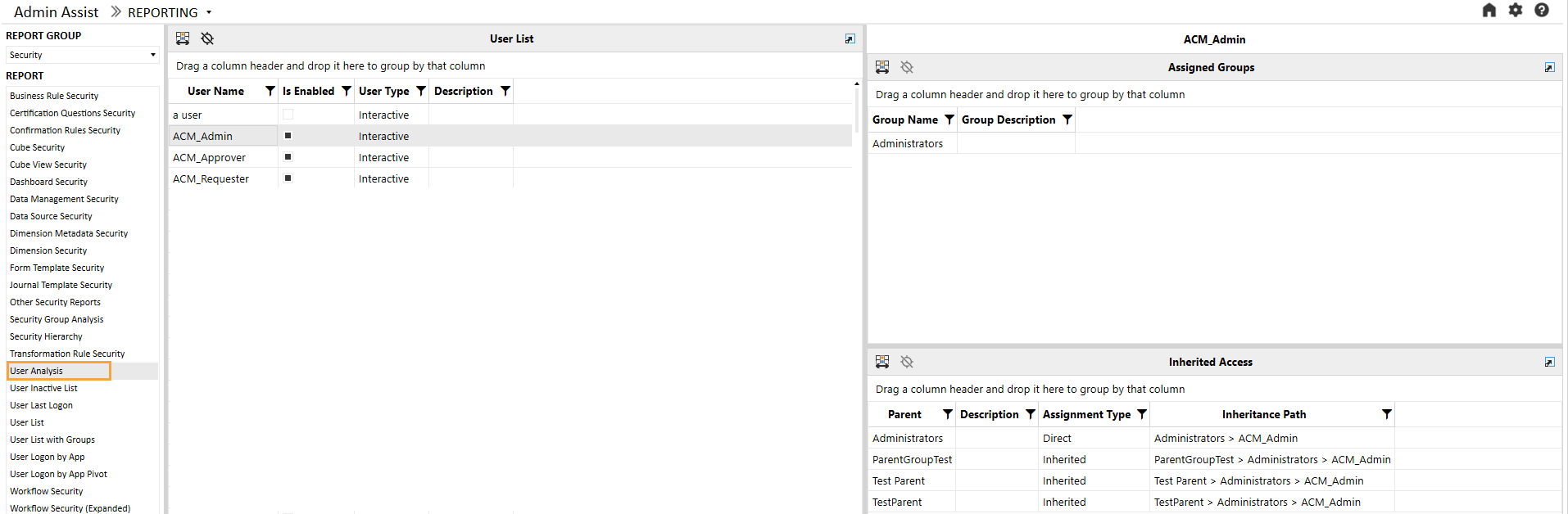
The top panel shows which groups the user has been directly provisioned in. In the previous example, ACM_Admin has been directly assigned to Administrators. This report has columns Group Name and Group Description.
The bottom panel shows which groups the user inherits based on their direct provisioning. In addition to the Parent and Description columns, this report has additional columns:
|
Attribute |
Description |
|---|---|
|
Assignment Type |
Direct indicates that the user has been directly provisioned in the group. Inherited indicates that the user receives access to this group indirectly through nested security groups. |
|
Inheritance Path |
This column shows how the user received access through an inheritance path. The first group on the left shows the group that the user is directly assigned to (for direct assignments, this will be the only group). Reading the inheritance path to the right will show how groups are nested to ultimately arrive at the top group. In the previous example, ACM_Admin is directly assigned to Administrators, and it inherits access to ParentGroupTest, Test Parent, and TestParent. |
User Inactive List
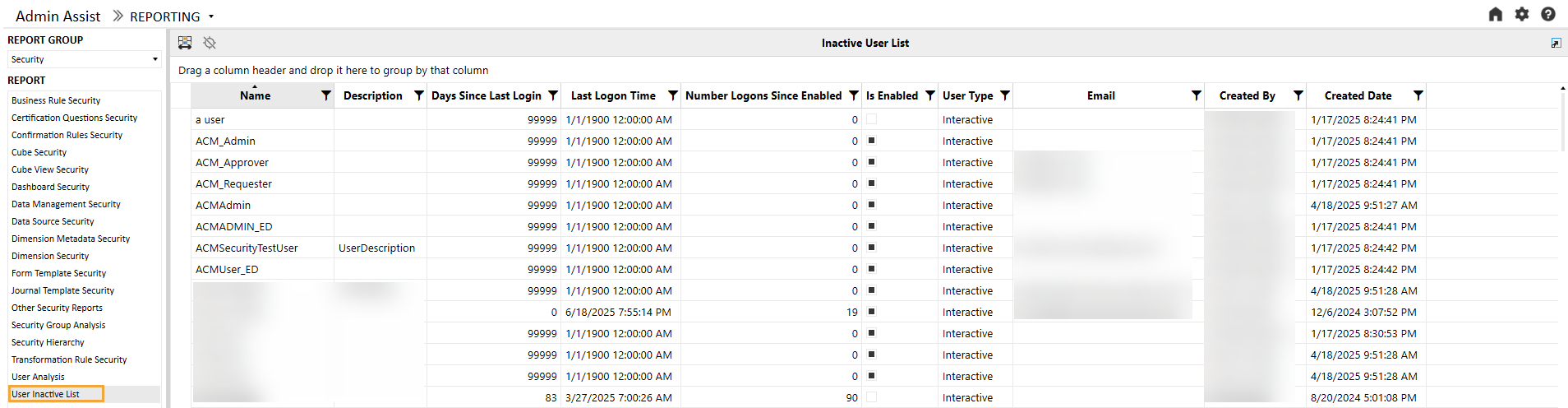
The User Inactive List shows a list of all users with no login history in the OneStream environment.
User Last Logon
The User Last Logon report shows a list of all users in the OneStream environment and the last time they logged in to the system.
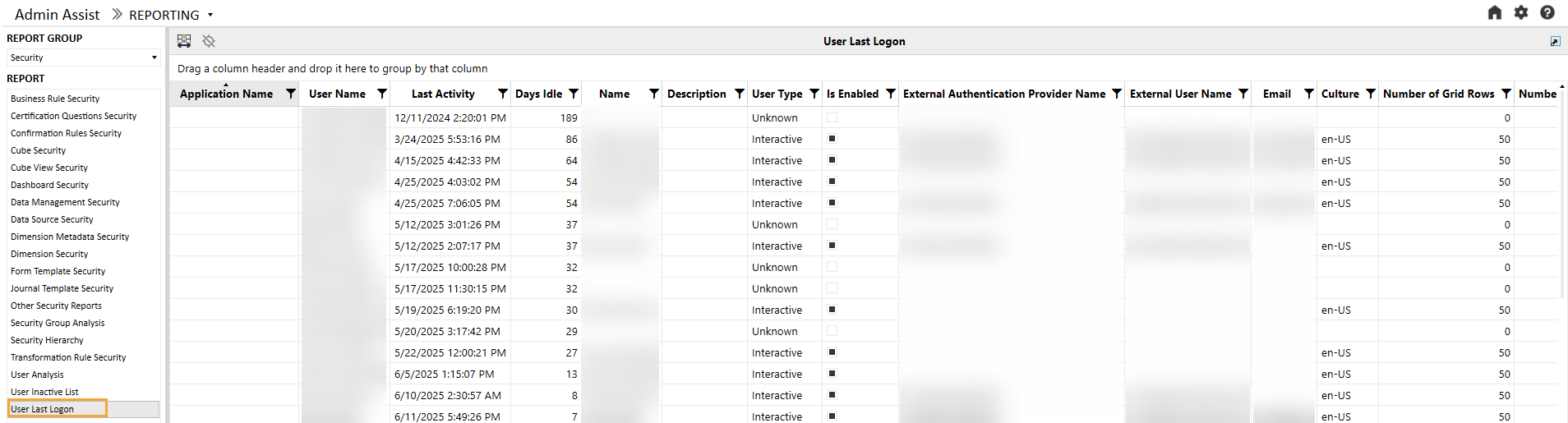
The following additional attributes are available on the report:
|
Attribute |
Description |
|---|---|
|
Application Name |
Last application the user logged on to |
|
Last Activity |
Time stamp of last activity |
|
Days Idle |
Calculation of days idle |
|
Name |
Name on the audit log (will be blank if the user has been deleted) |
|
Description |
User description |
|
User Type |
User type (will be Unknown if user has been deleted) |
|
Is Enabled |
If the user is enabled within the system or has been deactivated |
|
External Authentication Provider Name |
Name of the external authentication provider (for example, Azure AD) |
|
External User Name |
User name from the external authentication provider |
|
|
Email from Preferences section of profile |
|
Culture |
Culture from Preferences section of profile |
|
Number of Grid Rows |
Grid Rows Per Page under Preferences section of profile |
|
Number of Invalid Logon Attempts |
Number of invalid logon attempts by the user |
|
Text 1 – 4 |
Text fields associated with the user profile |
User List
The User List report is a comprehensive list of all users in the system and the attributes associated with their user profile.
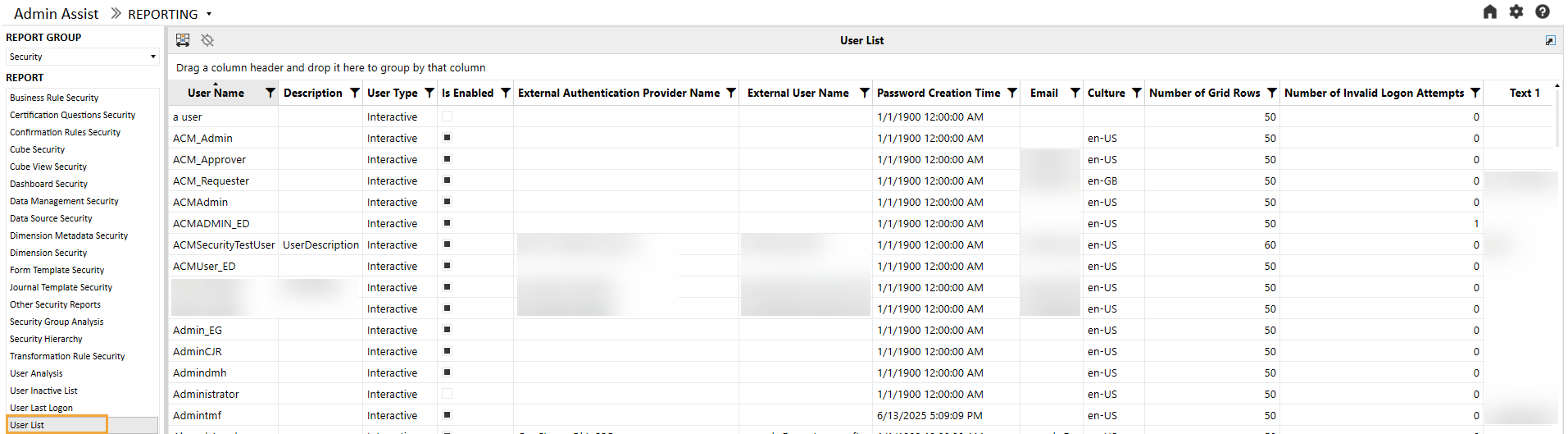
For each user, the following attributes are available in the report.
|
Attribute |
Description |
|---|---|
|
Description |
User description |
|
User Type |
User type (will be Unknown if user has been deleted) |
|
Is Enabled |
If the user is enabled within the system or has been deactivated |
|
External Authentication Provider Name |
Name of the external authentication provider (for example, Azure AD) |
|
External User Name |
User name from the external authentication provider |
|
Password Creation Time |
Password creation time (will be empty if external authentication) |
|
|
Email from Preferences section of profile |
|
Culture |
Culture from Preferences section of profile |
|
Number of Grid Rows |
Grid Rows Per Page under Preferences section of profile |
|
Number of Invalid Logon Attempts |
Number of invalid logon attempts by the user |
|
Text 1 – 4 |
Text fields associated with the user profile |
|
User’s Groups |
Groups that the user is directly assigned to |
User List by Group
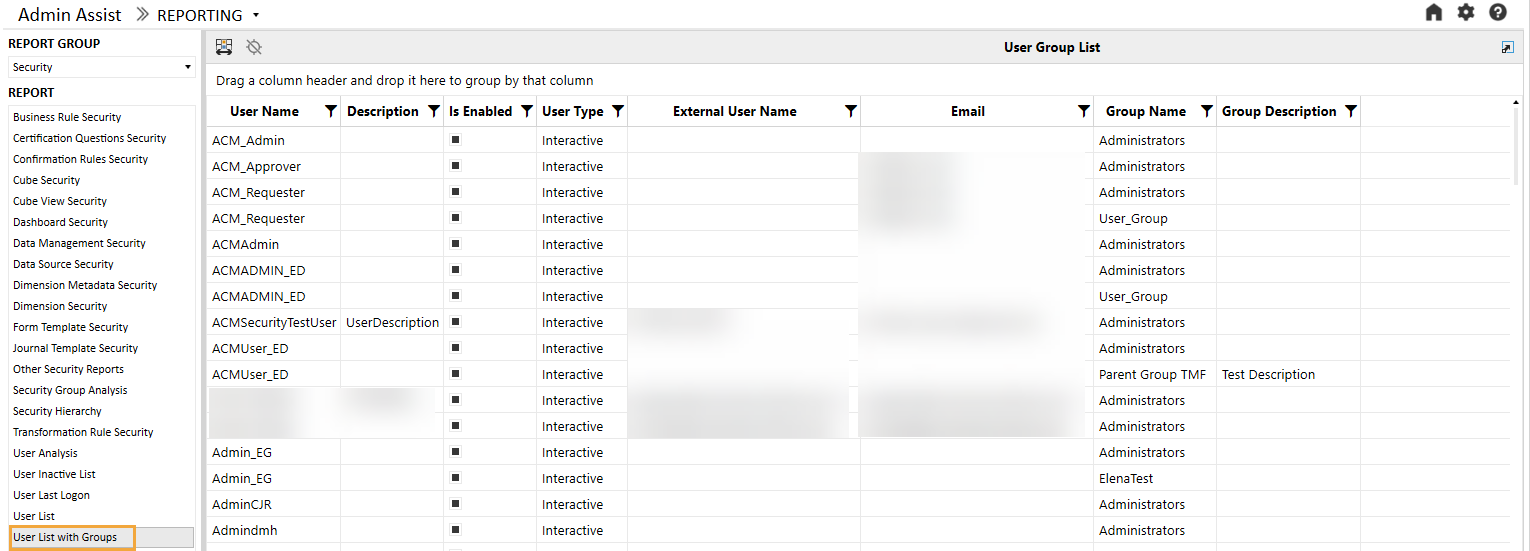
The User List by Group report is identical to the User List report with the addition of Group Name and Group Description fields.
User Logon By App
The User Logon By App report is a detailed list of all applications and the last logon by user. Unlike the User Last Logon report, which lists the last time a user logged on, this report will show the last time a user logged on by application. This may be helpful if multiple applications are used in the environment.
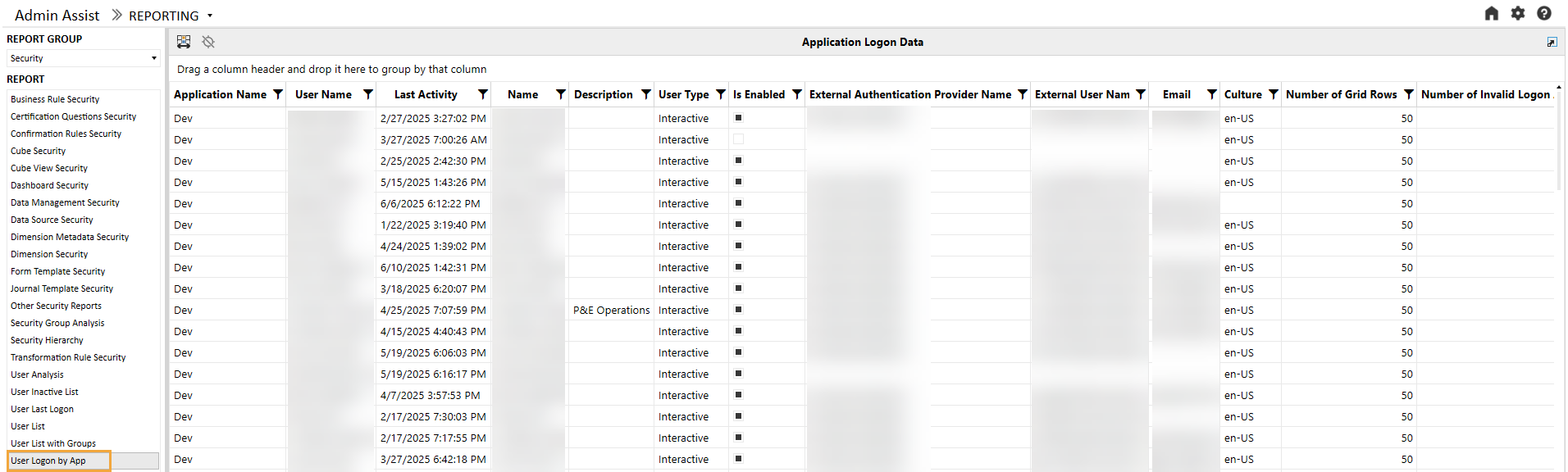
The following additional attributes are available on the report:
|
Attribute |
Description |
|---|---|
|
Application Name |
Name of the application the user logged on to |
|
Last Activity |
Time stamp of last activity by app |
|
Name |
Name on the audit log (will be blank if the user has been deleted) |
|
Description |
User description |
|
User Type |
User type (will be Unknown if user has been deleted) |
|
Is Enabled |
If the user is enabled within the system or has been deactivated |
|
External Authentication Provider Name |
Name of the external authentication provider (for example, Azure AD) |
|
External User Name |
User name from the external authentication provider |
|
|
Email from Preferences section of profile |
|
Culture |
Culture from Preferences section of profile |
|
Number of Grid Rows |
Grid Rows Per Page under Preferences section of profile |
|
Number of Invalid Logon Attempts |
Number of invalid logon attempts by the user |
|
Text 1 – 4 |
Text fields associated with the user profile |
Workflow Security
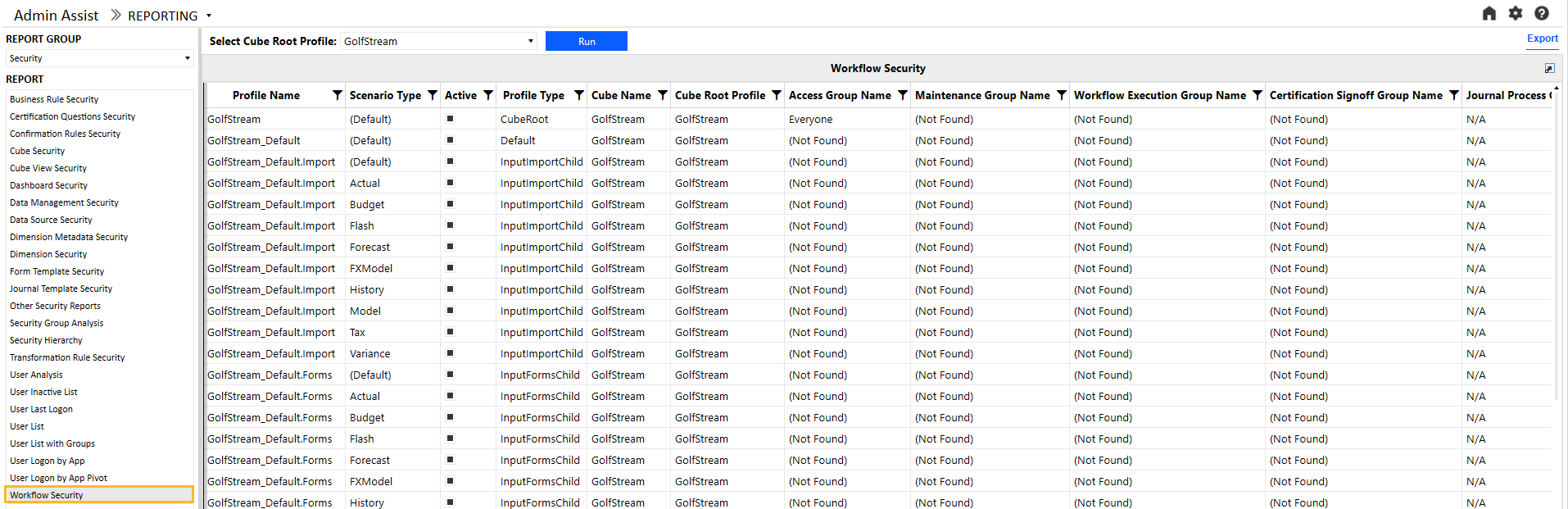
The Workflow Security report shows all security group assignments associated with all workflows and Scenario Types in the OneStream application. Users can also filter the workflows to a specific Cube Root Profile and further filter it to a specific workflow and its dependents. The following example shows this report with a table of the attributes.
NOTE: When the Active flag is false and all groups use the default group settings, the Workflow Profile-Scenario Type combination will not display on the report. However, if a Workflow Profile has any security group assigned, even if it is not active, it will show up on the report.
|
Attribute |
Description |
|---|---|
|
Profile Name |
Workflow Profile name |
|
Scenario Type |
Scenario Type |
|
Active |
Indicates if the profile is active or not |
|
Profile Type |
Workflow Profile type |
|
Cube Name |
Name of the cube associated with the workflow |
|
Access Group Name |
Controls the user or users that will have access to the Workflow Profile at runtime to view results |
|
Maintenance Group Name |
Controls the user or users that will have access to maintain and administer the Workflow Profile group |
|
Workflow Execution Group Name |
This group is configured for data loaders and allows users to run the workflow. |
|
Certification Signoff Group Name |
This group is configured for certifiers and allows users to sign off on the workflow. This group can be used to separate duties between a data loader and certifier. |
|
Journal Process Group Name |
Access to this group allows users to process a journal. |
|
Journal Approval Group Name |
Access to this group allows users to approve a journal. |
|
Journal Post Group Name |
Access to this group allows users to post a journal. |
Workflow Security (Expanded)
The expanded Workflow Security (Expanded) report shows all security group assignments associated with all workflows and Scenario Types in the OneStream application. Users can also filter the workflows to a specific Cube Root Profile and further filter it to a specific workflow and its dependents. The following example shows this report with a table of the attributes.
NOTE: When the Active flag is false and all groups use the default group settings, the Workflow Profile-Scenario Type combination will not display on the report. However, if a Workflow Profile has any security group assigned, even if it is not active, it will show up on the report.
 report.png)
|
Attribute |
Description |
|---|---|
|
Profile Name |
Workflow Profile name |
|
Scenario Type |
Scenario Type |
|
Active |
Indicates whether the profile is active or not |
|
Profile Type |
Workflow Profile type |
|
Cube Name |
Name of the cube associated with the workflow |
|
Access Group Name |
Controls the user or users that will have access to the Workflow Profile at runtime to view results |
|
Access Group Descendent Name |
For access groups that contain other groups or users, the child group will display here. (Only shown for groups and users detail level) |
|
Access Group Descendent Type |
Indicates whether the child is a group or user (only shown for groups and users detail level) |
|
Access Group Inheritance Type |
Indicates whether the child is directly assigned or inherits access to the parent |
|
Maintenance Group Name |
Controls the user or users that will have access to maintain and administer the Workflow Profile group |
|
Workflow Execution Group Name |
This group is configured for data loaders and allows users to run the workflow. |
|
Certification Signoff Group Name |
This group is configured for certifiers and allows users to sign off on the workflow. This group can be used to separate duties between a data loader and certifier. |
|
Journal Process Group Name |
Access to this group allows users to process a journal. |
|
Journal Approval Group Name |
Access to this group allows users to approve a journal. |
|
Journal Post Group Name |
Access to this group allows users to post a journal. |


