IMPORTANT: Only users assigned to the preparer access group can complete the following tasks on the Home page.
To enter data for a Profile, select the Profile from the grid and select the Manage button.
Administrators have the option to complete or revert a workflow using the Complete Workflow and Revert Workflow buttons. If the workflow is locked or completed, no data can be entered for that Profile. If something is updated, like a Factor or Definition, the data will only update in open workflows while all data in locked or completed workflows remains the same.
Carbon Calculations
IMPORTANT: The Calculate button displays if Carbon Performance Manager is enabled. See Extensions.
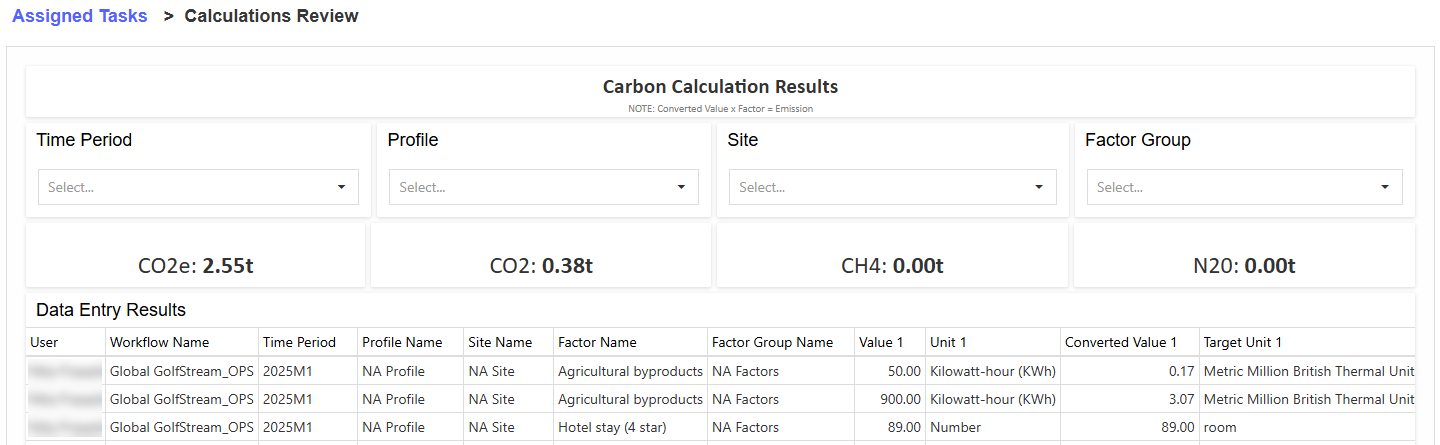
To view carbon calculations for emissions Factors, select the Calculate button. This displays carbon calculations for the year and scenario selected in the Workflow POV and displays the results on a new page. The page displays header tiles that show the CO2e, CO2, CH4, and N2O totals. The carbon calculator does not trigger scope 2 market calculations. See Manage Roles for enabling calculation access.
Data Entry
There are three tabs for data entry: Definitions, Emissions, and Utilities. Navigate to the following pages for the data entry process.
Data Entry Status
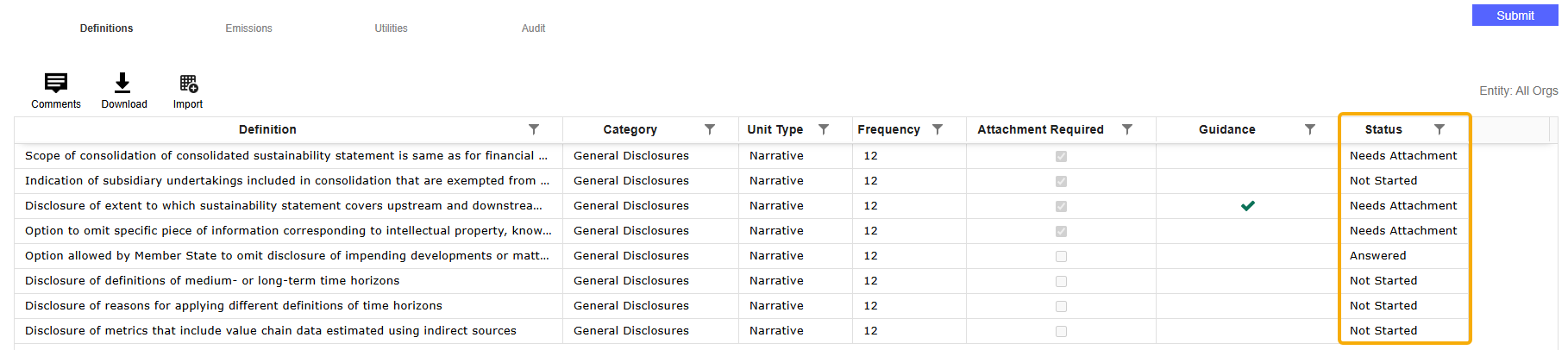
All Definitions, Factors, and Utilities that require data entry have a column indicating the item's status. The following statuses display in the column:
-
Not Started: This status displays if no data is entered for the Definition, Factor, or Utility. This is the default status.
-
Answered: This status displays when all required data is entered for the Definition, Factor, or Utility.
-
Needs Attachment: This status displays if data is entered for the Definition or Factor, but a required attachment is not uploaded. A Profile cannot be submitted until all required attachments are uploaded. Attachments are not required for Utilities.
Data Entry Considerations
-
All calculations are run when a Profile is submitted.
NOTE: Converted values have a maximum length of 1038-1 characters.
-
If a user is in the Access Group for a Site but not in the Access Group for the Profile that Site is assigned to, the Profile will still display in the grid. They can enter data in the Emissions and Utilities tabs, but the Definitions tab will not display data.
-
If a Definition, Site, Factor, or Factor Group is disabled, inactive, or removed from the Profile, any data records associated remain visible in the grid. This data can only be viewed, not be modified or saved.

