The purpose of the Custom Service Factory is to provide a method in which you can add customizations to the Transaction Matching solution.
IMPORTANT: Maintain your assembly as customizations will not remain in place during a solution upgrade.
Set Up the Custom Service Factory
-
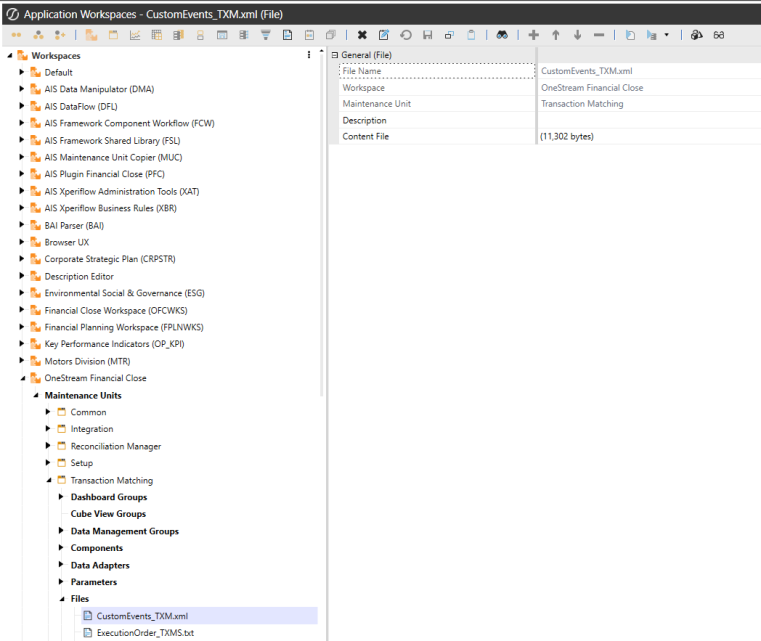
On the Application tab, go to Workspaces > OneStream Financial Close > Maintenance Units > Transaction Matching > Files.
-
In the Files folder, click CustomEvents_TXM.xml.
-
In the General (File) pane, click the Download File button, and save the file.
-
On the Application tab, click Tools > Load/Extract.
-
On the Load tab, locate CustomEvents_TXM.xml using the Select File icons and click Open.
Change Assemblies Setting Upon Install
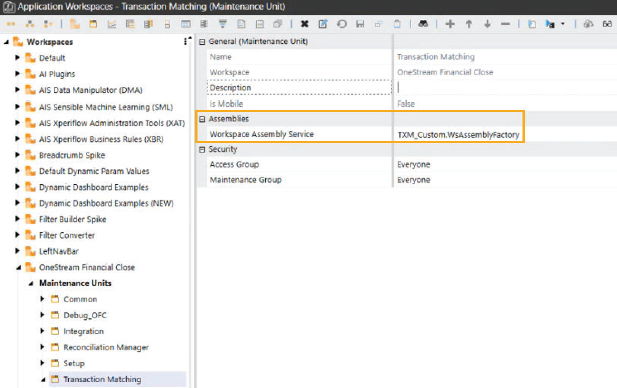
1. On the Application tab go to Workspaces > OneStream Financial Close > Maintenance Units > Transaction Matching.
2. In the Workspace Assembly Servicefield, type TXM_Custom.WsAssemblyFactory.
Maintain Assembly
1. On the Application tab, click Tools > Load/Extract > Extract.
2. Clear the All checkbox.
3. Go to Workspaces > OneStream Financial Close > Maintenance Units > Transaction Matching > Workspace Assemblies.
4. Select TXM_Custom.
5. Click the extract button  .
.
NOTE: Extract assembly before uninstalling UI.


