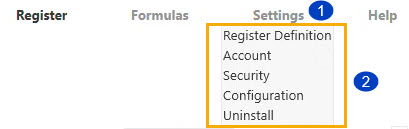
In OneStream's Line Item Modeling solution, the Settings drop-down menu enables the administrator to access the settings for Register Definition, Accounts, and Security. If further adjustments need to be made to the settings, you can do so from the respective dashboards. In addition to accessing your current solution configuration, this solution offers a way to export your configuration and apply it to another application or instance. See Configuration. As an administrator, you can export your configuration JSON file to capture additional settings, such as Global Drivers, Cube Drivers, Lookup Drivers or Formulas, which are detailed in the documentation. The standard Uninstall Full option is available in Settings as well. See Uninstall.
To access the settings menu, follow the legend and corresponding instructions:
-
Hover your cursor over the Settings menu.
-
Choose from the following settings menus: Register Definition, Account, Security, Configuration, and Uninstall.


