Additional application configurations can be applied within the Local Application Data Settings.
Once you open a configuration file within the utility, open Local Application Data Settings.
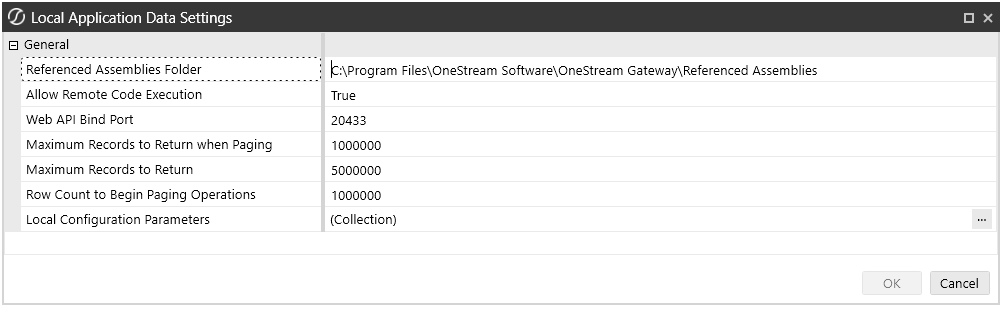
You can:
-
Reference a location to additional DLLs that will be used in remote business rules.
-
Adjust the Maximum Records to Return. These are optional and are only defined if needed or if further tuning is necessary by a consultant or as instructed by Support.
-
Store Configuration Parameters and associated values.
Referenced Assemblies Folder
The Referenced Assemblies Folder specifies the location of customer-supplied DLLs that can be referenced when remote Smart Integration Functions are compiled and executed. You will need to add the DLL name to the Smart Integration Functions Referenced Assemblies property. The default value is C:\Program Files\OneStream Software\OneStream Gateway\Referenced Assemblies.
IMPORTANT: Any custom DLLs added to the SIC Referenced Assemblies folder must be compiled for the modern .NET runtime, including assemblies targeting .NET 10, .NET (Core), or .NET Standard. .NET Framework–only assemblies are not supported and will not load when SIC is running on .NET 10.
NOTE: If you are integrating SAP with ERPConnect, add ERPConnect and the required DLLs to the Referenced Assemblies folder and C:\Windows\System32 folder per instructions. Refer to Support for DLL Migration.
Allow Remote Code Execution
Web API Bound Port
The port that Smart Integration Connector uses to communicate with the internal API.
Maximum Records to Return when Paging
Defaults to 1,000,000 and defines the number of rows to return per page/block to OneStream APIs. This value is used only when greater than the "Row Count to Begin Paging Operations" rows are returned from a query. Example: If the query returns 3 million rows and Row Count to Begin Paging is set to 1 million, there would be 3 blocks of 1 million rows returned to OneStream.
NOTE: Maximum Records to Return when Paging, Maximum Records to Return, and Row Count to Begin Paging Operations are optional and should only be applied by a OneStream consultant or OneStream Support.
Maximum Records to Return
Defaults to 5,000,000 and is the maximum number of rows that can be returned from any one query.
The maximum recommended number of records to return is 5 million and is the default. Additional RAM/CPU resources would be required on the Smart Integration Connector Gateway Server and on the remote database server to surface large quantities of data. If this limit is exceeded, you will receive a "Smart Integration Connector Remote Query" error.
NOTE: Maximum Records and Row Counts Settings: When large data volumes are returned (over 1,000,000 rows), to maintain performance and reliability, Smart Integration Connector automatically transfers the data in pages.
NOTE: Smart Integration Connector has a threshold limit of 5 million rows and 5GB.
NOTE: It is a best practice that you review any queries that return more than 1 million rows with your Database Administrator, because additional tuning may be required. Tuning these queries will improve performance, reduce resource usage, and make them more efficient.
Row Count to Begin Paging Operations
Defaults to 1,000,000 and is the number of rows returned before the dataset is returned through pages/blocks.
Local Configuration Parameters
This is where you can set key value pairs, such as Web API keys, usernames, and passwords, that can be referenced from business rules. These key value pairs are defined as Configuration Parameter Name and Configuration Parameter Value.
For example, the Configuration Parameter Name is SFTP_PASSWORD. Sensitive information, such as the password, is stored in the Configuration Parameter Value on the Local Gateway Server and does not need to be stored in the OneStream Windows Application.

NOTE: Configuration Parameter Values are masked and encrypted by default. When setting up the parameter, you will have the option of always showing the parameter in plain text.
Then, in a business rule, you can reference the Configuration Parameter Name and do not need to know the password or other sensitive information that is stored in the Configuration Parameter Value. For example, in the following business rule the sftpPassword Configuration Parameter Name is referenced. The GetSmartIntegrationConfigValue API can be used in a Smart Integration Function to reference the Configuration Parameter Name, which may be needed in a business rule to access a local data source.
Dim passwordString As String = APILibrary.GetSmartIntegrationConfigValue("SFTP_PASSWORD")
