Genesis Release PV9.0.0 GV2.1.0
The theme for this Minor release is enhancements to help you work more efficiently and confidently by identifying compatible content, creating a more intuitive and consistent design experience, and simplifying upgrades through automatic configuration retention. These improvements help you find the right content faster, navigate more efficiently, and transition between versions with minimal disruption.
Enhancements
-
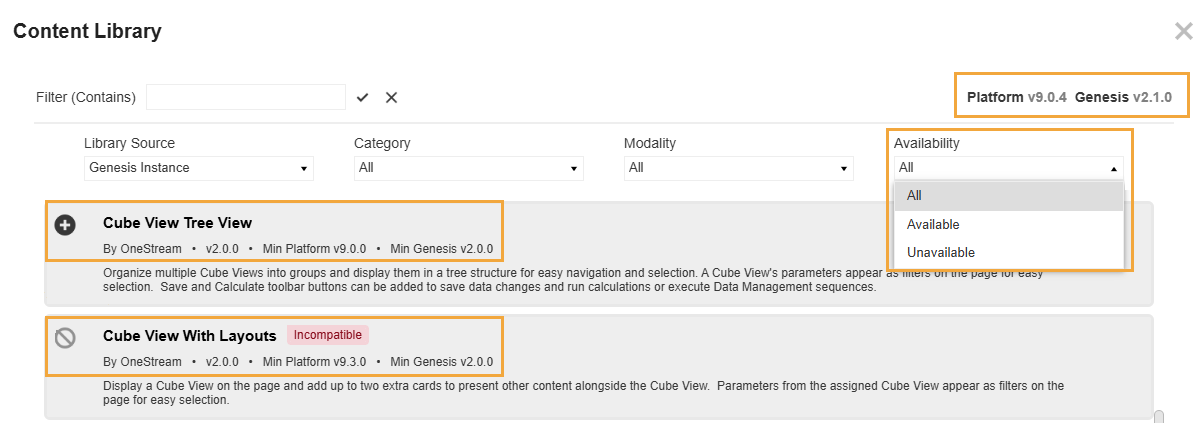
Find compatible Content Blocks more efficiently. The Content Library automatically evaluates every Content Block against your current platform and Genesis versions, clearly labeling incompatible items and preventing them from being injected. Use the Availability filter to quickly narrow your view to only Content Blocks that are fully supported in your environment. (GEN1-2701)
-
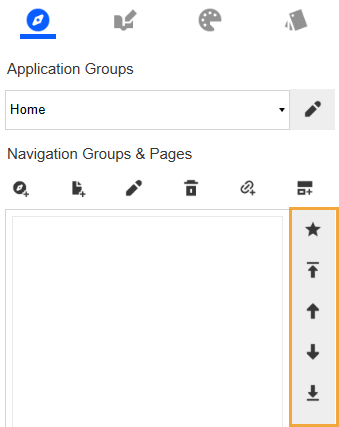
Discover existing sort order actions easier. On the Navigation page, icons on the vertical toolbar align with the standard dark gray styling used throughout the interface, making actions easier to identify at a glance and creating a more consistent visual experience. (GEN1-2884)
-
Simplify upgrades with configuration retention. When upgrading from Genesis Version 2.0.0 to a later version, all of your library and instance management settings are automatically preserved, helping you maintain continuity and quickly resume work after the upgrade. These additional settings now retain their values:
-
Enable the Library Service in Genesis Designer > Settings > Library Management > SETTINGS
-
Block Force-Upgrade Mode in Genesis Designer > Settings > Library Management > SETTINGS
-
Default Preview State in Genesis Designer > Settings > Instance Management > UTILITIES
(GEN1-2158)
-
-
The Genesis solution upgrade runs as a background task rather than as part of the active session. This reduces timeout risk on large instances and makes the upgrade process more resilient. Content Block upgrades are unchanged.
NOTE: Upgrade logic is driven by the version being upgraded from, not the version being upgraded to. This means the full benefit of this change will be realized when upgrading from Genesis Version 2.1.0 to a future release.
-
This release includes internal improvements to how Genesis processes several actions in Genesis Designer. These changes bring more consistent behavior across instance management, navigation menu management, and Content Block import and injection.
Most users will not notice any difference. However, if you have built automation or tooling that depends on specific UI messages, status text, or interface element states in these areas, we recommend validating that tooling against Genesis Version 2.1.0 before upgrading your production environment. Minor changes to display messages in the affected workflows are expected as a result of this standardization work. (GEN1-2801, GEN1-2634, GEN1-2797, GEN1-2635, GEN1-2621)
Upgrade Information
-
To upgrade an instance of Genesis to the latest release, see Upgrade an Instance.
-
To upgrade a Content Block, see Upgrade Content Blocks.
Compatibility
-
Minimum Platform Version 9.0.0 is required. OneStream recommends upgrading to the latest platform version.
-
The live Content Library service is currently supported only for customer cloud deployments. On-premises deployments should use the Genesis Instance Workspace library instead. Download the Content Blocks from OneStream Solution Exchange and import them into your Genesis library.
Documentation
The Getting Started with Solutions Guide provides general instructions to install and configure OneStream Solutions. It also includes the recommended display settings, package file name information, advice for solution database migration, and considerations for modifications to solutions.
See the Getting Started with Solutions Guide.
Contact Support
Contact OneStream Support by registering at:
Genesis Release PV9.0.0 GV2.0.0
The theme for this Major release is a new feature to upgrade Content Blocks, which improves the life-cycle management, and enhancements to improve relationship visibility, delete options, and the user experience.
New Features
-
You can upgrade eligible injected Content Blocks to the latest version. This new feature displays the upgrades available, including compatibility requirements, and enables you to individually select which Content Blocks to upgrade. (GEN1-1827)
Enhancements
Navigation and Content Management
-
Navigation trees display a clearer and more complete view of Content Block relationship hierarchies. The Navigation page displays nested child items. The Content Management page displays all parent references and nested children. This enhancement is available when using Layout Blocks Version 2.0.0 or later. (GEN1-273)
-
You can add and edit custom descriptions for injected Content Blocks that display in the navigation trees. These custom descriptions enable you to create user-friendly descriptions while maintaining the Maintenance Unit name. (GEN1-184)
-
By default, Pages are collapsed in the navigation tree, which provides a clean starting view that you can expand as needed. (GEN1-1291)
-
On the Navigation page, when you delete a Content Block, you have the options to detach it from the current location or permanently delete it from the instance. (GEN1-1551)
-
On the Action Manager page, you can enter dynamic values in POV configurations using parameters (~|Parameter|~) and substitution variables (~SubstitutionVariable~). (GEN1-2061, GEN1-2069)
-
When you configure a Content Block, details are available on demand when you click the Show block Info icon. This keeps the Designer tab focused on configuration options with additional details accessible when needed. (GEN1-1292)
Styles and Colors
-
The Styles page features updated titles and tooltips to better describe the purpose and function of each setting, improving clarity and usability. (GEN1-264)
-
Deleting a color set on the Colors page requires confirmation. (GEN1-205)
Application Group Menu
-
The Application Group panel in the end-user view has smaller text for improved readability and a simplified toggle control. Open and close actions are now handled by a single menu button on the left edge of the panel. (GEN1-2084)
Upgrade Information
-
To upgrade an instance of Genesis to the latest release, see Upgrade an Instance.
-
To upgrade a Content Block, see Upgrade Content Blocks.
Compatibility
-
Minimum Platform Version 9.0.0 is required. Maximum Platform Version is 9.3.x.
-
The live Content Library service is currently supported only for customer cloud deployments. On-premises deployments should use the Genesis Instance Workspace library instead. Download the Content Blocks from OneStream Solution Exchange and import them into your Genesis library.
Contact Support
Contact OneStream Support by registering at:
Genesis Release PV9.0.0 GV1.1.0
The theme for this Minor release is improving performance efficiency.
Enhancements
-
The performance has been optimized for injecting a Content Block in a Page or in another Content Block. Latency is reduced, and run speed is improved. (GEN1-1569)
-
When you create a Navigation Group or Page in the Genesis Navigation page, the navigation tree refreshes more efficiently. This update reduces time and enhances the user experience. (GEN1-1576)
Upgrade Information
-
To upgrade an instance of Genesis to the latest release, see Upgrade an Instance in the Genesis Guide.
Compatibility
-
Minimum Platform Version 9.0.0 is required.
-
The live Content Library service is currently supported only for customer cloud deployments. On-premises deployments should use the Genesis Instance Workspace library instead. Download the Content Blocks from OneStream Solution Exchange, and import them into your Genesis library.
Documentation
-
Only the Release Notes were updated for this release. The Genesis Guide has not been updated except to change the release number.
Contact Support
Contact OneStream Support by registering at:
Genesis Release PV9.0.0 GV1.0.1
The theme for this Hotfix release is a bug fix to correct the security group assignment functionality for Application Groups.
Fixed Issues
-
For Admin, Config, and Help Application Groups, only users who are in the assigned Access Group can view the Application Group in the Genesis Navigation page. (GEN1-1349)
Upgrade Information
-
To upgrade an instance of Genesis to the latest release, see Upgrade an Instance in the Genesis Guide.
Compatibility
-
Minimum Platform Version 9.0.0 is required.
-
The live Content Library service is currently supported only for customer cloud deployments. On-premises deployments should use the Genesis Instance Workspace library instead. Download the Content Blocks from OneStream Solution Exchange, and import them into your Genesis library.
Documentation
-
Only the Release Notes were updated for this release. The Genesis Guide has not been updated except to change the release number.
Contact Support
Contact OneStream Support by registering at:
Genesis Release PV9.0.0 GV1.0.0
The live Content Library service is currently supported only for customer cloud deployments. On-premises deployments should use the Genesis Instance Workspace library instead. Download the Content Blocks from OneStream Solution Exchange, and import them into your Genesis library.
Contact Support
Contact OneStream Support by registering at:

