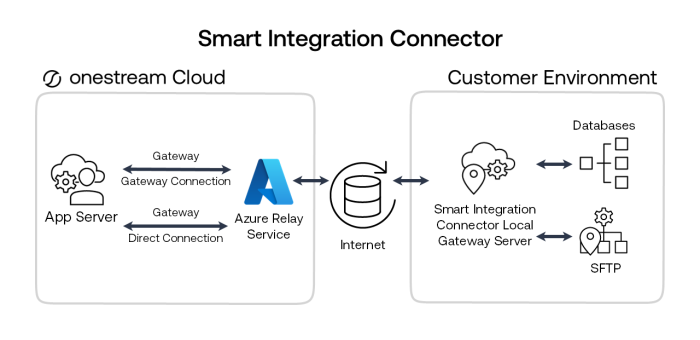
NOTE: In OneStream, Custom Database Server Connections define the relationship between the Smart Integration Connector connection gateway and the data source.
The two primary services of Smart Integration Connector are:
-
OneStream Application Server: The application server brokers communication between the OneStream Cloud instance application and the Azure Relay service.
-
Local Gateway Server: Instances of the Smart Integration Connector Local Gateway Server are installed inside your network and configured to make direct connections to designated data sources. The Smart Integration Connector Local Gateway Server runs as a Windows service and brokers communication between local data sources and Azure Relay using an outbound connection over port 443. All communication is encrypted end to end through TLS.
The components of the Smart Integration Connector are:
-
OneStream Windows Application client
Direct and Gateway Connections configured through
System > Administration > Smart Integration Connector.NOTE: The SmartIntegrationConnectorAdminPage role must be assigned to a user for this to be visible
-
A Custom Database Connection to the local gateway data source. Custom Database Connections are configured in
System > System Configuration > Application Server Configuration > Database Server Connections.NOTE: The ManageSystemConfiguration role must be assigned to a user for this to be visible.
-
OneStream Smart Integration Connector Local Gateway Server
-
Connection Settings provide the information to establish the relationship with the OneStream Windows Application. Connection Settings are exported from the connection settings in the OneStream Windows Application and imported to the Local Gateway section of the OneStream Local Gateway Configuration.
-
Local Gateway Connections provide the setup information necessary for the Smart Integration Connector Local Gateway to connect to local data sources. Local Gateway Connections are set up through the OneStream Local Gateway Configuration in the Gateway Connections Settings section.
-
TLS/SSL Certificate
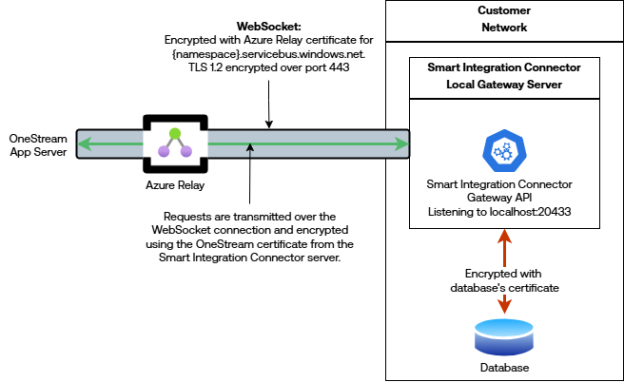
Communication between the OneStream Application Server(s) is encrypted end-to-end. For additional information about certificates and certificate errors, see Troubleshooting.
Gateway Connection example:
Direct Connection example:
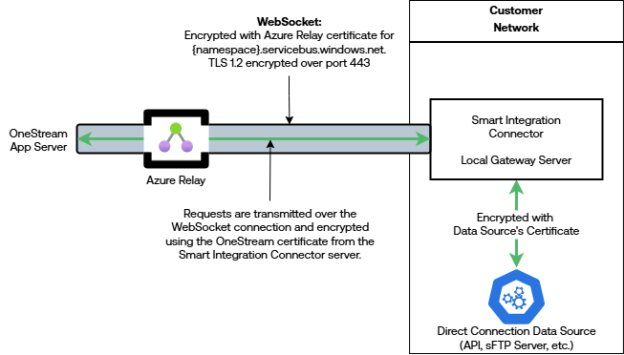
NOTE: Certificate errors in the OneStream Application Server caused by a domain name mismatch between the WebAPI domain name and OneStream hostname are ignored. This occurs because the business rule uses localhost:{boundPort} for the hostname and the response contains a certificate with a hostname specific to the API (for example, someapi.org).
Additional Considerations
-
To provide high availability there can be multiple instances of a designated local gateway server, each running on a separate server bound to the same connection.
-
Multiple local gateways can be installed to establish global connectivity to data sources in different subnetworks.
-
Local gateway configuration must align to the corresponding connection as defined in the OneStream Windows application. An export process from the OneStream Windows application connection user interface can assist with the alignment to ensure corresponding names and keys are identical.
-
TLS Inspection: Azure Relay expects an end-to-end TLS 1.2+ session between the agent and the Relay endpoint under
*.servicebus.windows.netover TCP 443. If a TLS inspection device terminates or substitutes the certificate (full MITM), the Relay handshake and token validation can fail. The reliable pattern is to bypass TLS decryption for*.servicebus.windows.netand allow a straight CONNECT/forward-proxy or direct egress on 443. You can still enforce egress controls with domain allow-lists and outbound IP rules.


